


Average Number of Pages on a Business Website (2026 Data)
By Josh Ternyak

April 20, 2026
The average business website has 16–65 pages depending on business type and industry. This exhaustive data guide covers page count benchmarks across business size, industry, and website type — plus the research on how page count affects SEO, user experience, and conversion, and how to think about site architecture strategically.
Key Statistics: Business Website Page Counts
Why Page Count Is a More Complex Question Than It Appears
The question of "how many pages should a website have?" appears simple on the surface but opens into one of the more nuanced discussions in web strategy. Page count isn't a metric to optimize in isolation — it's an emergent property of strategic decisions about what a business needs to communicate, who they need to communicate it to, and how search engines should understand the scope and authority of the site.
Too few pages and a website fails to capture the breadth of search intent it should rank for, fails to address the full range of visitor questions and objections, and signals to search engines that the site is a shallow resource rather than a comprehensive authority. Too many pages — particularly pages with thin, duplicated, or low-quality content — creates indexation bloat that dilutes search authority, confuses visitors, and generates crawl budget waste that prevents important pages from being indexed efficiently.
The right page count is the number that fully serves the business's legitimate communication needs, comprehensively addresses visitor questions across all stages of the buying journey, and supports a logical site architecture that both visitors and search engines can navigate efficiently. This guide provides the data to calibrate that number for your specific context.
Average Business Website Page Count by Business Type
Business TypeTypical Page Count RangeOptimal RangeNotesLocal service business (plumber, electrician)5 – 15 pages8 – 20 pagesService pages per location keyRestaurant / food service4 – 10 pages6 – 12 pagesMenu, hours, reservations essentialRetail shop (small)6 – 20 pages10 – 25 pagesProduct categories; blog adds valueProfessional services (law, accounting)10 – 40 pages15 – 60 pagesPractice area + location pagesHealthcare practice12 – 50 pages20 – 75 pagesService pages + condition pagesFreelancer / consultant5 – 15 pages8 – 20 pagesPortfolio + services + case studiesSmall e-commerce (50–200 products)60 – 250 pages80 – 300 pagesProduct + category pages drive countLarge e-commerce (1,000+ products)1,000 – 50,000+ pagesStructured catalogFaceted nav creates indexation complexitySaaS company (small)15 – 40 pages25 – 60 pagesFeatures, pricing, use cases, blogSaaS company (mid-size)40 – 200 pages60 – 300 pagesIntegrations, docs, case studiesMedia / news / content site100 – 100,000+ pagesQuality-definedEach article is a pageEnterprise corporation500 – 10,000+ pagesArchitecture-definedMultiple products, regions, languages
Page Count and SEO: The Research Evidence
The relationship between page count and SEO performance is one of the most studied questions in search engine optimization, and the research produces consistent findings that have important strategic implications.
Page Count RangeAvg Monthly TrafficAvg Lead GenerationSource1 – 50 pagesBaselineBaselineHubSpot Marketing Benchmark51 – 100 pages+48% vs 1–50+27% vs 1–50HubSpot Marketing Benchmark101 – 200 pages+120% vs 1–50+80% vs 1–50HubSpot Marketing Benchmark201 – 400 pages+230% vs 1–50+180% vs 1–50HubSpot Marketing Benchmark401+ pages+600% vs 1–50+400% vs 1–50HubSpot Marketing Benchmark
The correlation between page count and traffic/leads is real and large — but the causal mechanism is critical to understand correctly. The relationship is not "more pages → more traffic." The true relationship is "more high-quality pages covering more search intent → more organic traffic → more leads." The page count is a proxy for content breadth and search intent coverage. A site with 500 pages of thin, duplicated, or low-value content will not outperform a site with 50 excellent pages that comprehensively address the most important search intents in their market.
The businesses that have 400+ pages and 6x more leads than 1–100 page sites didn't build 400 pages strategically — they typically started with a small site and grew it over time by consistently adding valuable blog content, service detail pages, case studies, FAQ content, and resource materials that collectively captured a wider net of search intent and demonstrated domain expertise over months and years. This growth trajectory is the model, not the destination.
The Essential Pages Every Business Website Needs
Before considering page count optimization, it's worth establishing the foundational pages that every business website needs regardless of industry. These are the non-negotiable pages that visitors expect and that convert existing demand into actual business outcomes:
PageEssential?SEO FunctionConversion FunctionHomepageYesBrand/authority signal; hub for internal linkingOrient visitor, drive to conversion pagesAbout / CompanyYesE-E-A-T signal (expertise, experience, trust)Build trust, humanize the brandServices / Products overviewYesCategory-level keyword targetingHelp visitors find their specific needIndividual service/product pagesYes (one per offering)Specific keyword targeting; long-tailConvert specific service interestContact pageYesNAP (name, address, phone) signal for local SEOPrimary conversion actionPrivacy PolicyYes (legal)Required for ad platforms, GDPR complianceTrust signal in footerTerms of ServiceSituationalLegal protectionTrust signalTestimonials / ReviewsStrong recommendationKeyword-rich social proof contentTrust and conversion signalCase Studies / PortfolioFor service businessesLong-form high-quality contentProof of outcomesBlog / Resource hubStrong recommendationPrimary traffic growth vehicleLong-term lead generationFAQ pageRecommendedFeatured snippet opportunities; voice searchObjection handlingTeam / People pageFor service businessesE-E-A-T; personal search queriesTrust and relationship building

Service Pages: The High-Value Architecture Decision
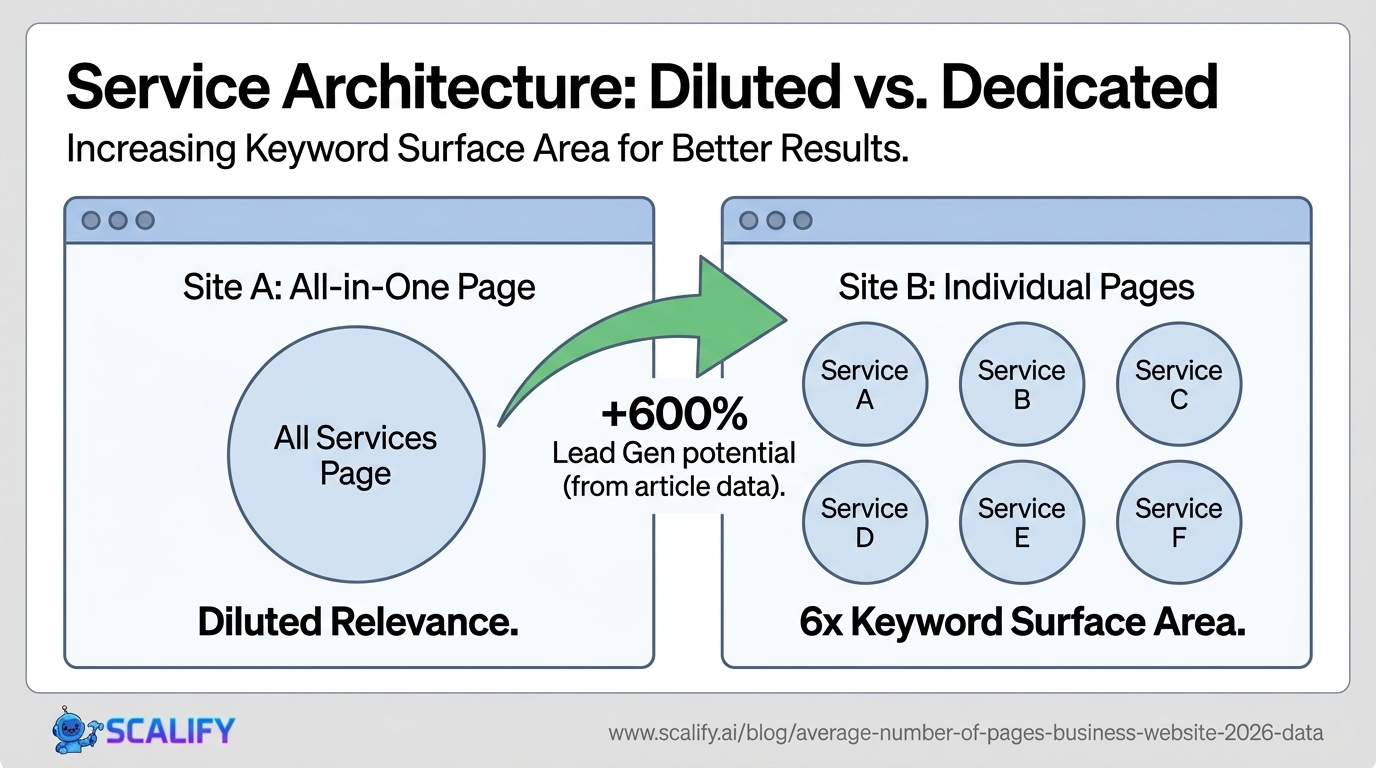
For service businesses, the decision of how to structure service pages is one of the highest-leverage SEO and conversion architecture decisions available. The core question: should "SEO services," "content marketing," and "paid advertising" each have their own dedicated page, or should they all live on a single "marketing services" page?
ApproachSEO ImpactConversion ImpactRecommendationOne page for all servicesPoor — diluted keyword relevanceMixed — visitors must self-navigateOnly for very small service sets (1–2 services)One page per serviceExcellent — dedicated URL for each keywordStrong — each visitor gets relevant contentStrongly recommended for 3+ servicesServices hub + individual service pagesBest — hub captures category keywords; subpages capture specificBest — clear navigation + specific informationBest practice for most service businessesService × location pages (local SEO)Essential for multi-location businessesHigh — location-specific content converts betterRequired for local search dominance
A home services company offering plumbing, HVAC, and electrical services should have at minimum: a plumbing services overview page, an HVAC services overview page, an electrical services overview page, and then individual pages for the specific services within each category (water heater installation, drain cleaning, AC repair, furnace installation, panel replacement, outlet installation, etc.). A company with 3 service categories and 5 services per category that builds 18 individual service pages — compared to a competitor with 3 combined service pages — has 6x the targeted pages and 6x the keyword surface area for the same actual service offering.
Location Pages: The Local SEO Page Count Multiplier
For businesses serving multiple geographic areas, location pages represent one of the highest-ROI page-creation strategies available. A plumbing company serving 8 cities should have individual location pages for each city — not because they need to repeat their services 8 times, but because people searching "plumber in [specific city]" want to see that city name in the search result and landing page, and Google wants to serve locally relevant results.
Business TypeLocation Page StrategyPage Count ImpactTraffic ImpactSingle-location local businessCity/neighborhood on contact page+0 pagesModerate local SEOMulti-city service business (5 cities)Dedicated page per city+5 pages+40–60% local trafficRegional business (20+ cities)Pages per city + county/region hubs+20–30 pages+100–200% local trafficNational business (local focus)State + major city pages+50–500 pagesDominant in targeted marketsFranchise (100+ locations)Individual location page each+100–500 pagesNear-complete local coverage
The critical requirement for location pages to produce SEO value rather than penalty: they must contain genuinely unique, locally relevant content, not template-generated pages that only differ in the city name. Google is highly effective at identifying "city swapped" location pages that provide no unique value to users — and it either ignores them or, in cases of particularly aggressive doorway page creation, penalizes them. Effective location pages include local testimonials, locally relevant service information, local team members, local landmarks in the copy, and content that a resident of that city would recognize as genuinely about their area.

Blog Content: The Primary Page Count Growth Engine
Blogging FrequencyMonthly New Pages AddedAnnual Traffic ImpactLead Generation ImpactNo blog0BaselineBaseline1 post/month~1–2 pages (post + tags)+15–25%+20%4 posts/month (weekly)~4–8 pages+60–80%+50–70%8 posts/month (2x/week)~8–16 pages+100–150%+100–120%16+ posts/month (daily+)16–35 pages+200–400%+180–300%
The "434% more indexed pages" statistic for websites with blogs vs. without reflects how blog architecture compounds page count. A single blog post generates not just the post URL itself, but also category page appearances, tag page appearances, archive page appearances, author page appearances, and related post sections — each of which is a crawlable and potentially indexable URL. For a WordPress blog, a single well-structured post might generate 5–8 additional indexed URLs beyond the post itself.
This compounding is part of why consistent blogging produces compounding SEO returns over time. A company that has published 400 blog posts over 4 years doesn't just have 400 more pages — it has 400 posts × 5 associated URLs = ~2,000 additional indexed URLs, plus the dramatically increased internal linking density that concentrates authority across the entire domain. This compound effect is the mechanism behind HubSpot's finding that 400+ page sites generate 6x more leads than 1–100 page sites.
Page Count by Industry: Detailed Benchmarks
IndustryTypical MinimumGood (Growing)Excellent (Authority)Key Page TypesLaw Firm10 pages25–60 pages100+ pagesPractice areas, attorney profiles, case results, locationMedical / Healthcare12 pages30–75 pages150+ pagesConditions, treatments, physicians, locations, FAQsDental Practice8 pages20–40 pages60+ pagesServices, technology, team, before/after, insuranceReal Estate Agency10 pages25–60 pages100+ pagesAgent profiles, neighborhoods, market reports, listingsRestaurant5 pages8–15 pages25+ pagesMenu, reservations, events, private dining, storyHVAC / Plumbing / Electrical8 pages20–45 pages80+ pagesServices × brands, locations, FAQs, maintenance tipsAccounting / CPA8 pages20–40 pages75+ pagesServices, industry specializations, team, resourcesSaaS / Software15 pages40–100 pages200+ pagesFeatures, integrations, use cases, pricing, blogE-Commerce (small)25 pages60–200 pages300+ pagesProducts, categories, brand pages, guidesMarketing / Creative Agency10 pages25–60 pages100+ pagesServices, industries, case studies, team, blog
E-Commerce: The Special Case of Product Catalog Pages
E-commerce websites require a different framework for page count analysis because the primary driver of page count — the product catalog — scales with business growth in ways that are structurally different from content sites. A small Shopify store with 50 products might have 85 total pages (50 product pages + 10 category pages + 15 core site pages + 10 blog posts). A mid-size e-commerce operation with 2,000 products might have 2,500+ indexed pages before adding any blog content.
Catalog SizeProduct PagesCategory PagesSupporting PagesTotal EstimatedSmall (50 products)5010–2015–2575–95Medium (500 products)50040–8020–40560–620Large (5,000 products)5,000200–40030–605,230–5,460Enterprise (50,000+ products)50,000+1,000+100+51,100+
The e-commerce page count challenge is qualitative rather than quantitative: as product catalogs scale into tens of thousands of SKUs, the risk of thin content pages increases dramatically. A product page for a common widget that says "Blue Widget — 2 inch — SKU 48291" with no unique description, no user reviews, no contextual content is a thin page that adds indexation overhead without adding proportional SEO value. The e-commerce SEO challenge is ensuring that product pages — particularly for commodity or similar products — are differentiated enough in content to justify their indexation.
The Traffic Distribution Reality: Most Pages Get Almost No Traffic
A critical reality of website page count that the aggregate data obscures: traffic is extremely concentrated on a small percentage of pages, with the vast majority receiving essentially no organic traffic.
Page DistributionTraffic ShareNotesTop 1% of pages~80% of all organic trafficHomepage, top-performing blog posts, key service pagesTop 10% of pages~95% of all organic trafficThe effective contentBottom 50% of pagesUnder 1% of trafficLong-tail, thin content, new pagesBottom 80% of pagesUnder 0.5% of trafficNear-zero organic visibility
This power-law distribution of traffic across pages is the norm, not the exception — even for the best-performing websites. The implication is that raw page count is significantly less important than the quality and strategic targeting of each page. A website with 1,000 pages where 800 generate effectively zero organic traffic has less actual SEO value than it appears on paper. Auditing the bottom of the page distribution for thin content, cannibalization issues, and underperformance opportunities is a high-ROI activity for any established website.
Site Architecture: Depth vs. Breadth
Architecture PrincipleRecommendationRationaleMaximum click depth from homepage3–4 clicks maximumDeeper pages get fewer crawls, less authorityNavigation menu items5–7 primary itemsCognitive load limit; over 7 items dilutes attentionFlat vs. deep structureFlat preferred for small sitesImportant pages stay close to rootHub-and-spoke content structureRecommended for content sitesPillar pages link to clusters; passes authorityInternal links per page3–10 contextual links minimumAuthority distribution + navigationOrphan pages (no internal links)Zero — all pages should be linkedOrphans rarely crawled or indexed
Site architecture is the factor that determines how effectively a website's existing pages translate into actual rankings and traffic. A site with 200 well-architected pages — with strong internal linking, logical hierarchy, and clear authority flowing from top to bottom — will significantly outperform a site with 500 pages that are organized chaotically, with orphaned pages, inconsistent linking patterns, and no clear topical clustering. Page count and site architecture are both necessary inputs; neither alone is sufficient for strong organic search performance.
Content Audit: When More Pages Is Actually Fewer
One of the most counterintuitive findings in SEO is that removing pages can increase organic traffic. This happens when a website has accumulated "content debt" — a large number of thin, outdated, duplicated, or cannibalistic pages that collectively dilute the site's quality signals and crawl budget without contributing proportional value. Google's John Mueller has repeatedly confirmed that content quality matters more than content quantity, and that a smaller site with consistently high-quality content can outperform a larger site with mixed quality.
Signs that a website has too many pages rather than too few:
A content audit that consolidates thin content, 301-redirects deprecated pages to their best current equivalents, and deindexes purely technical pages (search results pages, filter combinations) often produces measurable organic traffic improvements within 2–3 months as Google's perception of overall site quality improves.
The Bottom Line: Page Count Strategy for Different Business Stages
The practical guidance on page count depends significantly on where a business is in its website lifecycle:
New website (launching from scratch): Start with the 10–15 essential pages that cover your core service/product offering, about information, contact details, and local SEO foundations. Don't launch with placeholder pages or stub content to inflate apparent page count — Google treats low-quality pages as quality signals about the entire domain. Launch with 10 excellent pages rather than 30 mediocre ones.
Established small business site (1–3 years old, 15–30 pages): The highest-leverage page creation opportunities are typically: individual service detail pages if currently grouped on a single services page; location pages if serving multiple geographic areas; and beginning a consistent blog content program. Each of these expands the search intent surface without adding thin content.
Mid-size business (30–100 pages): At this stage, a structured content strategy is warranted. Identify the 20–30 highest-value informational keywords in your market (the questions your prospects ask before hiring you), create comprehensive content for each, and ensure strong internal linking between related content clusters. This is the stage where topical authority begins to compound.
Large content site or e-commerce (100+ pages): Conduct a content audit to identify thin, duplicated, or cannibalistic content before adding more pages. Optimize existing pages that rank on page 2 and 3 of Google before creating new content — improving existing rankings requires less investment than capturing new rankings. Implement a crawl budget optimization strategy to ensure important pages are crawled and indexed efficiently.
At Scalify, every website we build starts with a strategic page architecture designed for both conversion and organic growth — the right pages, in the right structure, with the internal linking and content depth that converts visitors and earns rankings from day one.
Top 5 Sources





























































.jpeg)


.jpeg)


































78 SW 7th St, Miami, FL 33130


