


The 20 Most Popular Website Builders in 2026: An In-Depth Review
By Josh Ternyak

April 22, 2026
An honest, fact-checked review of the top 20 website builders in 2026 — Webflow, Wix, Shopify, Squarespace, WordPress, Framer and more. Pricing, pros, cons, and who each is actually for.
Last updated: April 2026. All pricing and market share figures reflect data available at time of publication; builders frequently update pricing, so we've linked to official sources throughout for easy verification.
Choosing a website builder is one of the most consequential decisions a small business or creator will make in 2026. The wrong platform locks you into bad SEO, unpredictable costs, or a design you can't evolve. The right platform disappears into the background and lets your content and conversions do the work.
We've spent years building on almost every major platform listed below — as a professional website agency, we watch clients arrive frustrated from one builder and leave confidently on another. This review ranks 20 of the most-used website builders in 2026, breaks down who each one is actually for, and flags the hidden costs and ceilings that only show up after month three.
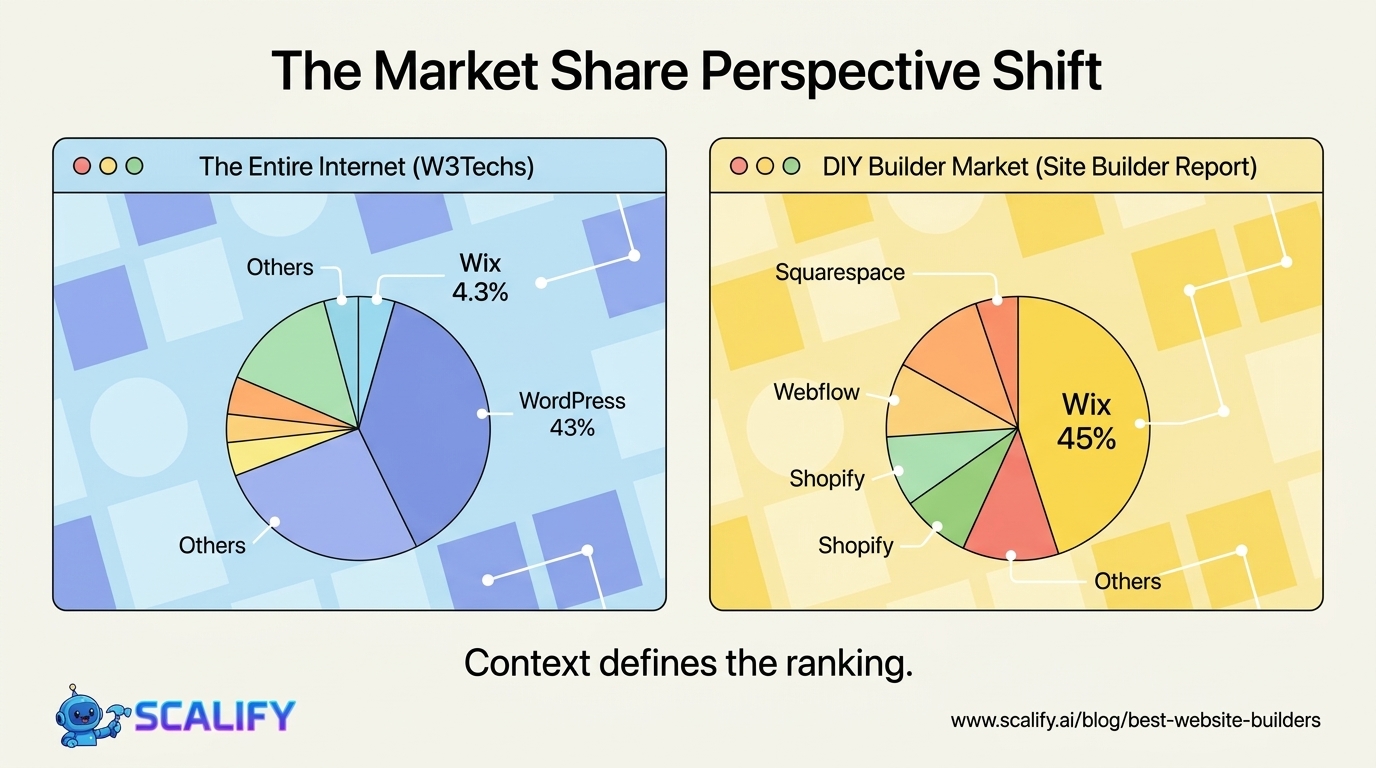
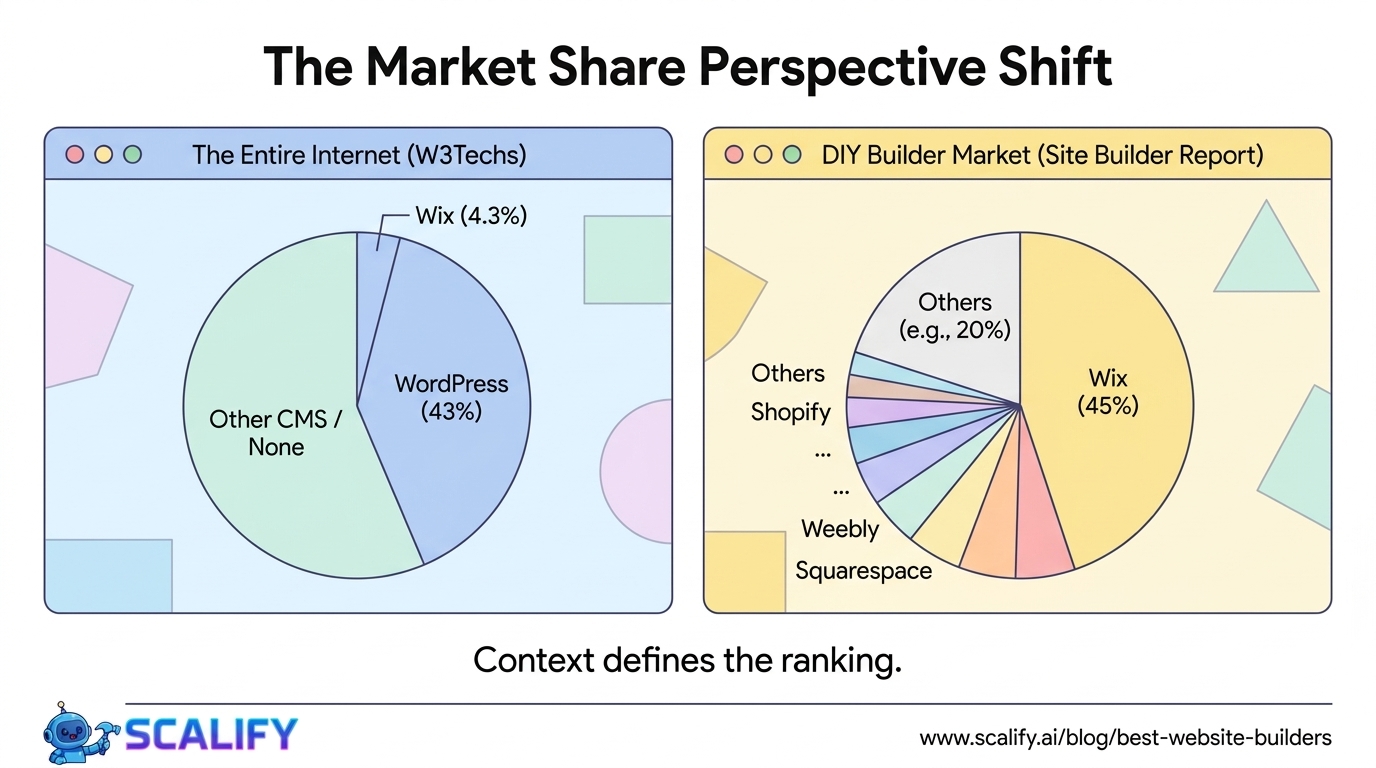
A note on the rankings: Market share data for website builders varies dramatically by source and methodology. W3Techs (which tracks all detected websites) places Wix at ~4.3% of the entire internet, while industry trackers like Site Builder Report measure "DIY website builder market share" and put Wix closer to 45%. We've ranked by overall adoption, relevance, and fit for small businesses — not by any single metric. Where we cite specific share numbers, we name the source.
Quick verdict (for skimmers):
- Best overall for most businesses: Webflow
- Best for DIY drag-and-drop: Wix
- Best for design-first brands: Squarespace
- Best for content and blogs: WordPress
- Best for ecommerce: Shopify
- Best for designers and modern landing pages: Framer
- Best budget option: Hostinger Website Builder
Let's get into the full list.
The Top 20 Website Builders in 2026 (Ranked)
- Webflow
- WordPress
- Wix
- Squarespace
- Shopify
- Framer
- GoDaddy Website Builder
- BigCommerce
- Hostinger Website Builder
- Weebly
- Duda
- Elementor (on WordPress)
- Jimdo
- IONOS MyWebsite
- Carrd
- Strikingly
- Site123
- Format
- Cargo
- Ghost
1. Webflow — Best Overall for Professional Websites
Best for: Agencies, marketing teams, SaaS companies, and small businesses that want a designer-grade website without a developer on staff.
Webflow is the closest thing the industry has to a "no-compromises" platform. You get the visual control of Figma, the CMS flexibility of a headless platform, and hosting that consistently scores well on Core Web Vitals — all in one tool.
Pricing (2026, annual billing, per webflow.com/pricing):
- Starter: Free (webflow.io subdomain only, 2 pages, 50 CMS items)
- Basic: $14/month — static sites, no CMS
- CMS: $23/month — up to 2,000 CMS items, blogs, dynamic content
- Business: Starts at $39/month — includes 10,000 CMS items and 2.5 TB bandwidth; higher CMS tiers scale up to $1,049/month
- Enterprise: Custom pricing
- Ecommerce Standard: $29/month (2% Webflow transaction fee, on top of Stripe/PayPal fees)
- Ecommerce Plus: $74/month (no Webflow transaction fee)
- Ecommerce Advanced: $212/month
Strengths:
- Pixel-perfect visual control with clean, semantic HTML/CSS output
- Strong CMS for structured content (well-suited for programmatic SEO)
- Fast hosting with solid Core Web Vitals performance
- Native integrations with Figma, Zapier, Memberstack, and Stripe
- Generous free plan for learning and prototyping
Weaknesses:
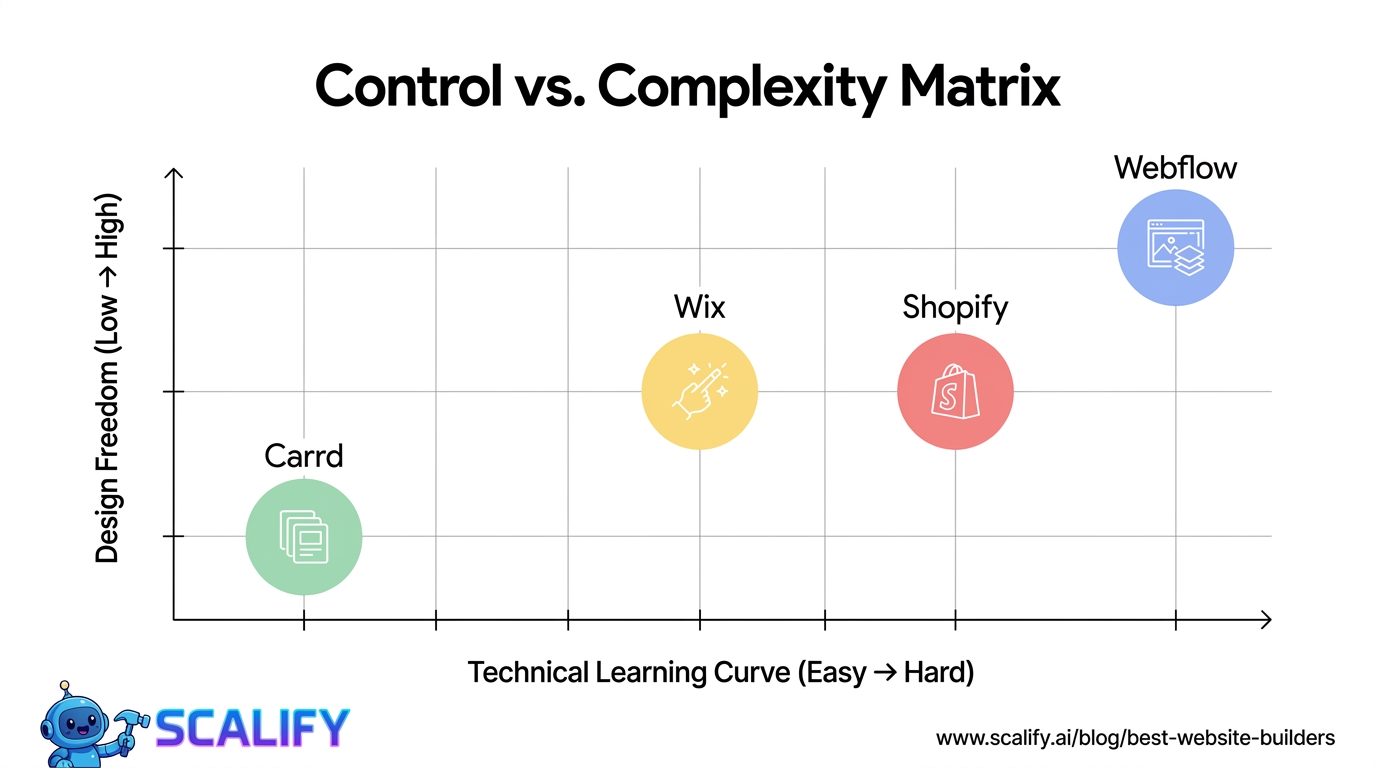
- Steep learning curve — the interface mirrors CSS logic, not simple drag-and-drop
- Pricing can feel fragmented (Site Plans + Workspace Plans + add-ons)
- Ecommerce is capable but not a serious retail platform at high volume
- Native User Accounts (memberships) were sunset on January 29, 2026 — membership sites now require third-party tools like Memberstack or Outseta (source: Webflow Help Center)
- Webflow's legacy Editor is being retired on August 4, 2026, requiring teams to migrate to the new seat/role-based editing system
Verdict: If you can afford either the learning curve or an agency to build it for you, Webflow is the best long-term bet for a marketing website in 2026. At Scalify, we build on Webflow for exactly this reason — it's the only platform that doesn't force you to choose between design freedom and marketing performance.
2. WordPress — Best for Content, Blogs, and Maximum Flexibility
Best for: Bloggers, publishers, membership sites, and any business that wants full ownership of their stack.
WordPress powers approximately 43% of all websites globally and holds roughly 60% of the CMS market (W3Techs data, via WPZOOM, April 2026). No other platform matches its plugin ecosystem or content flexibility. But "WordPress" in 2026 means two very different things: WordPress.com (the hosted, commercial version) and WordPress.org (the free, self-hosted open-source software).
Pricing:
- WordPress.com: Free tier up to ~$45/month (Creator, Entrepreneur plans) — see wordpress.com/pricing
- WordPress.org: Free software, but you pay for hosting ($5–$50+/month), plus any premium themes or plugins
Strengths:
- Over 60,000 free plugins in the official WordPress.org directory, plus tens of thousands more in premium marketplaces like CodeCanyon (WordPress.org Plugin Directory)
- Best-in-class blogging and publishing features
- Full code and data ownership on self-hosted installs
- Massive developer and agency talent pool
- SEO plugins (Yoast, Rank Math) are industry standards
Weaknesses:
- On self-hosted WordPress, you're responsible for security, updates, backups, and performance
- Core Web Vitals performance lags competitors without optimization work
- Plugin conflicts and theme lock-in are common
- The Gutenberg block editor is still inconsistent compared to modern visual builders
- Hidden costs pile up: hosting + premium theme + plugins can easily exceed $300/year
Verdict: WordPress remains unbeatable for content-heavy sites, blogs, and anyone who needs total control. But for a small business that just wants a professional website live quickly, the maintenance burden is real.
3. Wix — Best for DIY Drag-and-Drop
Best for: Solopreneurs, local service businesses, and non-technical users who want to launch something decent without hiring anyone.
Wix leads the DIY website builder category by most industry measures. Site Builder Report data cites roughly 45% of the DIY builder market (Site Builder Report, Jan 2026), while W3Techs data — which counts all detected sites on the internet — shows Wix at ~4.3% of the whole web. Different methodologies, but the conclusion is the same: Wix is the most widely used hosted builder.
Pricing (2026, annual billing, per wix.com/plans):
- Free plan (Wix branding, limited functionality)
- Light: $17/month
- Core: $29/month
- Business: $36/month (some resellers list $39; check Wix directly for your region)
- Business Elite: $159/month
- Enterprise: Custom
Strengths:
- Large template library (2,000+) and a genuinely free-form drag-and-drop editor
- Wix ADI AI tool generates a first draft site from a questionnaire
- Deep app ecosystem for booking, email marketing, memberships
- Strong SEO performance — Wix consistently scores a perfect 100 on Lighthouse SEO in third-party tests
- No-hassle hosting included
Weaknesses:
- You cannot switch templates after launch — locked in forever
- No code export; you're on Wix unless you rebuild elsewhere
- Design output can look generic when leaning on templates
- Ecommerce is capable but not a serious Shopify competitor at volume
- App fees stack quickly
Verdict: Wix is the safest default for most non-technical users. If you want something live this week and you're okay staying on Wix long-term, it's an excellent choice.
4. Squarespace — Best for Design-First Brands
Best for: Photographers, creatives, restaurants, wedding vendors, and personal brands where visual polish matters more than flexibility.
Squarespace is the builder that makes average websites look above average. Templates are genuinely beautiful, the editor is intentionally constrained (which keeps things from looking broken). In October 2024, private equity firm Permira completed its acquisition of Squarespace in an all-cash deal valued at approximately $7.2 billion (Permira press release, Oct 17, 2024), taking the company off the New York Stock Exchange. Founder Anthony Casalena remains CEO.
Pricing (per squarespace.com/pricing):
- Personal: $16/month
- Business: $23/month
- Commerce Basic: $28/month
- Commerce Advanced: $52/month
Strengths:
- Best-in-class templates for creative and service businesses
- Integrated scheduling (Acuity), email marketing, and memberships
- Clean, consistent design output with minimal effort
- Strong typography and image handling
- Reliable hosting with good performance
Weaknesses:
- Limited design flexibility compared to Webflow, Wix, or Framer
- Fewer third-party integrations than Wix or WordPress
- Ecommerce is fine for low-volume stores but not competitive with Shopify
- SEO customization is shallower than Webflow or WordPress
- No free plan (14-day trial only)
Verdict: If you're a creative or service business that wants a website to look effortlessly professional, Squarespace is the right call. For deeper customization, look at Webflow or Wix instead.
5. Shopify — Best for Ecommerce
Best for: Any serious online store — from first-time DTC brands to enterprise retailers.
Shopify holds roughly 26% of the ecommerce platform market, the largest share in the category (Site Builder Report, Jan 2026). It powers a disproportionate share of the DTC brands you've heard of.
Pricing (2026 US, per shopify.com/pricing):
- Starter: $5/month — social/mobile selling, not a full store
- Basic: $39/month monthly, $29/month with annual billing
- Grow: $105/month monthly, $79/month with annual billing
- Advanced: $399/month monthly, $299/month with annual billing
- Shopify Plus: Starts at $2,300/month on a 3-year term ($2,500/month on a 1-year term)
Third-party transaction fees (when not using Shopify Payments): 2% on Basic, 1% on Grow, 0.6% on Advanced.
Strengths:
- Industry-leading checkout (arguably the single biggest conversion advantage in ecommerce)
- Massive app ecosystem for shipping, subscriptions, reviews, upsells
- Shop Pay and Shop App network drive real revenue for merchants
- Native POS for omnichannel retail
- Unlimited bandwidth on all plans
- Strong international and multi-currency support
Weaknesses:
- Transaction fees apply if you don't use Shopify Payments
- App costs compound quickly — a typical store runs $50–$300/month in apps alone
- Theme customization beyond the basics requires Liquid (Shopify's template language)
- Content marketing features (blog, CMS) are weaker than Webflow or WordPress
- Not ideal for content-first sites with a small store attached
Verdict: If you're selling products online and you're serious about it, Shopify is the answer. Pair it with Webflow (or a headless setup) if you want a marketing site with best-in-class design.
6. Framer — Best for Designers and Modern Landing Pages
Best for: Startups, product teams, designers, and agencies building modern marketing sites with motion and interaction.
Framer overhauled its pricing in October 2025, collapsing its previous seven-tier structure into five cleaner plans (Framer blog, Oct 2025).
Pricing (2026, annual billing, per framer.com/pricing):
- Free — personal projects, framer.site subdomain
- Basic: $10/month — personal sites, portfolios, landing pages
- Pro: $30/month — the most popular plan for agencies and startups
- Scale: $100/month — high-traffic sites, flexible usage-based limits
- Enterprise: Custom
Note: Editor seats beyond the plan's allotment cost extra ($20/editor on Basic, $40/editor on Pro and Scale), and locale add-ons cost $20+/month each. The sticker price can understate the real cost for teams.
Strengths:
- Fastest learning curve of any pro-grade builder
- Built-in animations and micro-interactions that feel modern out of the box
- AI site generation (Wireframer) and AI Workshop coding assistant
- Excellent Core Web Vitals performance
- Clean responsive handling
Weaknesses:
- CMS is functional but less powerful than Webflow's
- Ecommerce is minimal
- Smaller ecosystem of integrations and agency talent than Webflow
- Basic plan is very limited (30 pages, 1 CMS collection, 10 GB bandwidth)
- Hidden costs from seats and locales can exceed the sticker price
Verdict: Framer is the builder to beat for modern B2B landing pages and startup marketing sites. If your site is roughly 20 pages with a blog and you care about design quality, Framer is often a better choice than Webflow.
7. GoDaddy Website Builder — Best for Local Small Businesses
Best for: Local service businesses that want a website, domain, and email in one bill.
GoDaddy Website Builder (officially "Websites + Marketing") is the quiet third-place builder by US market share (Site Builder Report). It's not the best at anything, but it's good at bundling website, marketing, email, and social into one dashboard for local businesses.
Pricing: GoDaddy's Websites + Marketing plans typically range from a Basic tier (~$10–$12/month) to an Ecommerce tier (~$20–$25/month), though promotional pricing for the first term is common. Check godaddy.com for current rates in your region.
Strengths:
- Integrated marketing planner, email marketing, and social dashboard
- Bundled with domain and business email
- Fast AI-assisted onboarding
- Reliable hosting infrastructure
- Good fit for plumbers, landscapers, salons — businesses that just need an online presence
Weaknesses:
- Limited design flexibility compared to Wix or Squarespace
- Weak SEO controls
- No serious ecommerce capability
- Sites tend to look similar across customers
- Not a long-term platform for ambitious growth
Verdict: If you're a local service business and GoDaddy is already your domain registrar, the convenience is real. For anyone building a brand, look elsewhere.
8. BigCommerce — Best Shopify Alternative for Mid-Market Ecommerce
Best for: Stores with meaningful revenue that want stronger built-in features without paying for Shopify apps.
BigCommerce is the other serious ecommerce platform. It has historically been more B2B-friendly and offers more native features (filtering, multi-storefront, promotions) without app dependencies.
Pricing: Plans typically range from Standard (~$39/month) to Pro (~$399/month) with Enterprise custom pricing. Each plan carries an annual revenue cap — cross the threshold and you're auto-upgraded. Check bigcommerce.com/essentials/pricing for current rates.
Strengths:
- No transaction fees on any plan
- More native features than Shopify (reduces app bloat)
- Strong B2B and headless commerce capabilities
- Better SEO control than Shopify out of the box
- Flexible checkout customization
Weaknesses:
- Smaller app ecosystem than Shopify
- Annual revenue caps on each plan
- Fewer agency partners and developers
- Theme quality is inconsistent
- Less polished merchant-facing UX
Verdict: A real Shopify alternative, especially for B2B or stores tired of app sprawl. Most DTC founders still default to Shopify because of the ecosystem.
9. Hostinger Website Builder — Best Budget Option
Best for: Cost-conscious first-time website owners who want AI site generation and hosting in one cheap bill.
Hostinger is primarily a web host that built its own AI-powered website builder.
Pricing: Promotional pricing is very aggressive (often $3–$5/month for the first term). Renewal pricing is meaningfully higher. Check hostinger.com for current intro and renewal rates.
Strengths:
- One of the cheapest real website builders in the category
- AI site generation is genuinely capable
- Decent performance for the price tier
- Free domain for the first year
- Recent Printful integration for lightweight print-on-demand
Weaknesses:
- Smaller app/integration ecosystem
- Renewal pricing is significantly higher than introductory rates
- Less template variety than Wix or Squarespace
- Not a platform for scaling beyond a basic site
- Fewer advanced SEO controls
Verdict: For a first business website on a tight budget, Hostinger is a compelling offer. Expect to outgrow it in 18–24 months.
10. Weebly — Declining but Still Functional
Best for: Very simple sites, especially those already in the Square ecosystem.
Weebly is owned by Square. Its market share has been declining — Colorlib's March 2026 analysis reported a 15% year-over-year drop — as Square has shifted its focus to Square Online.
Pricing (per weebly.com/pricing):
- Free plan with Weebly branding
- Professional: $12/month
- Performance: $26/month
Strengths:
- Genuinely easy drag-and-drop editor
- Unlimited storage and SSL on every plan (including free)
- Deep Square POS integration
- Decent starting point for basic needs
Weaknesses:
- Declining development pace
- Limited modern features compared to Wix or Squarespace
- Weak SEO controls
- Smaller template library
- Not a platform we'd recommend building a long-term business on
Verdict: If you already use Square for in-person payments and want a basic companion site, Weebly is fine. Otherwise, use Wix or Squarespace.
11. Duda — Best for Agencies and Resellers
Best for: Web design agencies and freelancers who build for clients under a white-label model.
Duda is a quiet giant in the agency market. Colorlib's 2026 data credits Duda with the highest Core Web Vitals pass rate in the builder category at roughly 85%.
Pricing: Plans typically range from Basic (~$19/month) to Agency (~$59/month) with custom reseller plans available. Check duda.co/pricing for current rates.
Strengths:
- Best-in-class Core Web Vitals performance
- White-labeling and multi-client management
- Strong team collaboration features
- Widgets for restaurants, service businesses, and location-based sites
- Solid SEO controls
Weaknesses:
- Low brand recognition with end-users (agency-focused)
- Smaller app ecosystem
- Less design flexibility than Webflow or Framer
- Ecommerce is functional but not competitive
Verdict: If you're an agency building 20+ sites a year, Duda is worth serious evaluation. For individual businesses, there are better consumer-focused options.
12. Elementor — Best Visual Builder on WordPress
Best for: WordPress users who want a visual editor instead of the native Gutenberg blocks.
Elementor is a WordPress plugin that's become dominant enough to function as its own ecosystem. The 2026 Elementor + Elementor Hosting combination delivers AI site planning, integrated hosting on Google Cloud, and a full platform experience.
Pricing: The free Elementor plugin works on any WordPress site. Elementor Pro starts at an annual fee (pricing tiers by site count) and Elementor Hosting adds managed hosting on top. Check elementor.com/pricing for current rates.
Strengths:
- Massive design flexibility on the WordPress stack
- AI Site Planner (Angie) generates full layouts
- Huge theme and template library
- Integrated hosting option on Google Cloud
- Large community of developers and designers
Weaknesses:
- Performance depends heavily on hosting and theme choice
- Can produce bloated HTML/CSS if not managed carefully
- Still inherits WordPress maintenance burdens
- Plugin conflicts can break pages
- Learning curve if you're new to WordPress
Verdict: Elementor is the right choice if you want WordPress's flexibility without Gutenberg's friction. Pair it with quality hosting (Kinsta, WP Engine, or Elementor Hosting).
13. Jimdo — Best for Simple AI-Generated Sites
Best for: Very small businesses in Europe, freelancers, and anyone who wants a 1–5 page site generated from a short questionnaire.
Jimdo is a German-born builder with strong European adoption. Its AI builder generates a site in minutes from a short onboarding questionnaire.
Pricing: Plans typically span a free tier up to higher-volume business plans. Check jimdo.com/website/pricing for current rates in your region.
Strengths:
- AI-generated sites are fast to launch
- Strong GDPR and European legal compliance
- Clean, simple templates
- Affordable pricing
Weaknesses:
- Very limited customization compared to Wix or Squarespace
- Small app ecosystem
- Not strong for SEO
- Limited ecommerce
- Better known in Europe than the US
Verdict: A fine choice for a simple 3-page business site, particularly in Europe. Not a long-term growth platform.
14. IONOS MyWebsite — Best Budget European Builder
Best for: European small businesses wanting cheap, reliable web hosting with a built-in builder.
IONOS (formerly 1&1) is one of Europe's largest hosts, and its MyWebsite Now builder is a competent budget option bundled with hosting and domain.
Pricing: Promotional first-term pricing is very low; renewal pricing is meaningfully higher. Check ionos.com for current rates.
Strengths:
- Very cheap introductory pricing
- Bundled hosting, domain, and email
- Reliable European infrastructure
- Decent AI-assisted onboarding
Weaknesses:
- Significant renewal price increases
- Dated template library
- Limited design customization
- Weak ecommerce
- Smaller feature set than Wix or GoDaddy
Verdict: If you're in Europe and already use IONOS for hosting, the builder is a reasonable add-on. Otherwise, Wix or Hostinger is a better choice at similar prices.
15. Carrd — Best for Single-Page Sites
Best for: Personal landing pages, link-in-bio pages, simple portfolios, and one-pager marketing sites.
Carrd is intentionally narrow: it only builds single-page (or very short) sites.
Pricing (per carrd.co/pricing):
- Free: Carrd subdomain, Carrd branding
- Pro Lite: $9/year
- Pro Standard: $19/year
- Pro Plus: $49/year
Strengths:
- Extremely affordable
- Fast, lightweight pages with great performance
- Clean, modern templates
- Custom domain on paid plans
- Form handling and basic dynamic features
Weaknesses:
- Single-page only (mostly)
- No CMS
- No ecommerce
- Limited to simple sites
- Not a platform for a real business website
Verdict: Perfect for link-in-bio, personal sites, event landing pages, or a pre-launch teaser. Outgrow it the moment you need a blog or a real marketing site.
16. Strikingly — Best for One-Page Business Sites
Best for: Very small businesses that want a single-page, mobile-optimized site with some dynamic features.
Strikingly is similar to Carrd but slightly more feature-rich — basic ecommerce, blogs, and forms are supported in a single-page format.
Pricing: Plans span from a free tier to a VIP tier. Check strikingly.com/s/pricing for current rates.
Strengths:
- Easy mobile-first editor
- Single-page sites with smooth scroll sections
- Basic ecommerce and blog support
- Good for personal brands and solopreneurs
Weaknesses:
- Limited design flexibility
- Small template library
- Weak SEO controls
- Better options at every price tier
Verdict: Fine for a quick single-page site. Carrd is usually a better (cheaper) option at the low end, and Wix/Squarespace are better at the higher end.
17. Site123 — Easiest Ultra-Beginner Builder
Best for: Complete beginners who want a site live in under an hour with zero design decisions.
Site123 leans hard into simplicity — you answer a few questions, pick a template, and you're live. There's almost no design flexibility, and that's the point.
Pricing: Plans span a free tier with branding up to higher-storage business plans. Check site123.com for current pricing.
Strengths:
- Fastest time-to-live of any builder
- Guided editor prevents design mistakes
- 24/7 live chat support
- Mobile-optimized by default
Weaknesses:
- Very limited design control
- Small template library
- Weak SEO
- Poor ecommerce
- Not a platform for any ambitious project
Verdict: Use only if the absolute priority is speed-to-launch with zero learning curve. For almost any other goal, there's a better option.
18. Format — Best for Photographers and Visual Portfolios
Best for: Photographers, illustrators, designers, and visual artists building portfolio sites.
Format is niche by design — built for visual creatives. Templates are portfolio-first, image handling is excellent, and proofing/client galleries are native features.
Pricing: Plans range from a basic tier to a workflow tier with client-galleries and print-store features. Check format.com/pricing for current rates.
Strengths:
- Strong portfolio templates
- Native client proofing and gallery delivery
- Excellent image compression and delivery
- Integrated print store
- Booking add-ons
Weaknesses:
- Only makes sense for visual creatives
- Not a general-purpose builder
- Weaker blog and content features
- Small ecosystem
Verdict: If you're a photographer or visual artist, Format is purpose-built for you. Everyone else should look at Squarespace or Webflow.
19. Cargo — Best for Art-Directed Portfolios
Best for: Designers, art directors, and studios that want a portfolio with strong design expression.
Cargo sits between Format and a full builder. It's beloved by art directors and studios for its intentionally expressive templates.
Pricing: Plans include a free tier with Cargo branding and a paid Pro tier. Check cargo.site for current rates.
Strengths:
- Genuinely distinctive, design-forward templates
- Curated community of designers and studios
- Simple pricing
- Strong typography controls
Weaknesses:
- Very narrow use case (portfolios, art/design)
- Small feature set
- Not suitable for business or ecommerce
- Small ecosystem
Verdict: If you're a designer or studio who wants your portfolio to feel designed, Cargo is wonderful. For any other use case, it's the wrong tool.
20. Ghost — Best for Modern Publishers and Newsletters
Best for: Writers, journalists, and creators running paid newsletters or membership publications.
Ghost isn't a traditional website builder — it's a modern publishing platform that competes with Substack and Beehiiv. But thousands of independent writers and publishers use it as their primary website, so it earns a spot here.
Pricing (per ghost.org/pricing):
- Ghost(Pro) starts at a lower tier for small audiences and scales up by member count
- Self-hosted: Free software, you pay for your own hosting
Strengths:
- Built for paid memberships and newsletters
- Clean reading experience and fast performance
- Strong SEO out of the box
- Open source — you can self-host
- No platform take rate (unlike Substack's 10%)
Weaknesses:
- Not a drag-and-drop builder — themes are code-edited
- Less suitable for traditional business websites
- Smaller theme library
- Steep learning curve if you self-host
Verdict: For serious independent writers and publishers building paid audiences, Ghost is an excellent platform in 2026. Not a general website builder for small businesses.
How to Choose the Right Website Builder in 2026
The decision usually comes down to four questions:
1. What's the site actually for?
- Marketing site → Webflow, Framer, or Wix
- Blog/content → WordPress or Ghost
- Online store → Shopify (or BigCommerce)
- Portfolio → Format, Cargo, or Squarespace
- Local service business → GoDaddy or Wix
- Link-in-bio/landing page → Carrd
2. How technical are you?
- Non-technical → Wix, Squarespace, GoDaddy, Hostinger
- Semi-technical → Framer, Shopify, Squarespace
- Technical or have a developer → Webflow, WordPress, Ghost
3. How important is design quality?
- Maximum design control → Webflow
- Modern, motion-heavy design → Framer
- Effortlessly polished → Squarespace
- Functional but flexible → Wix, WordPress
4. What's your real budget (not just the plan cost)?
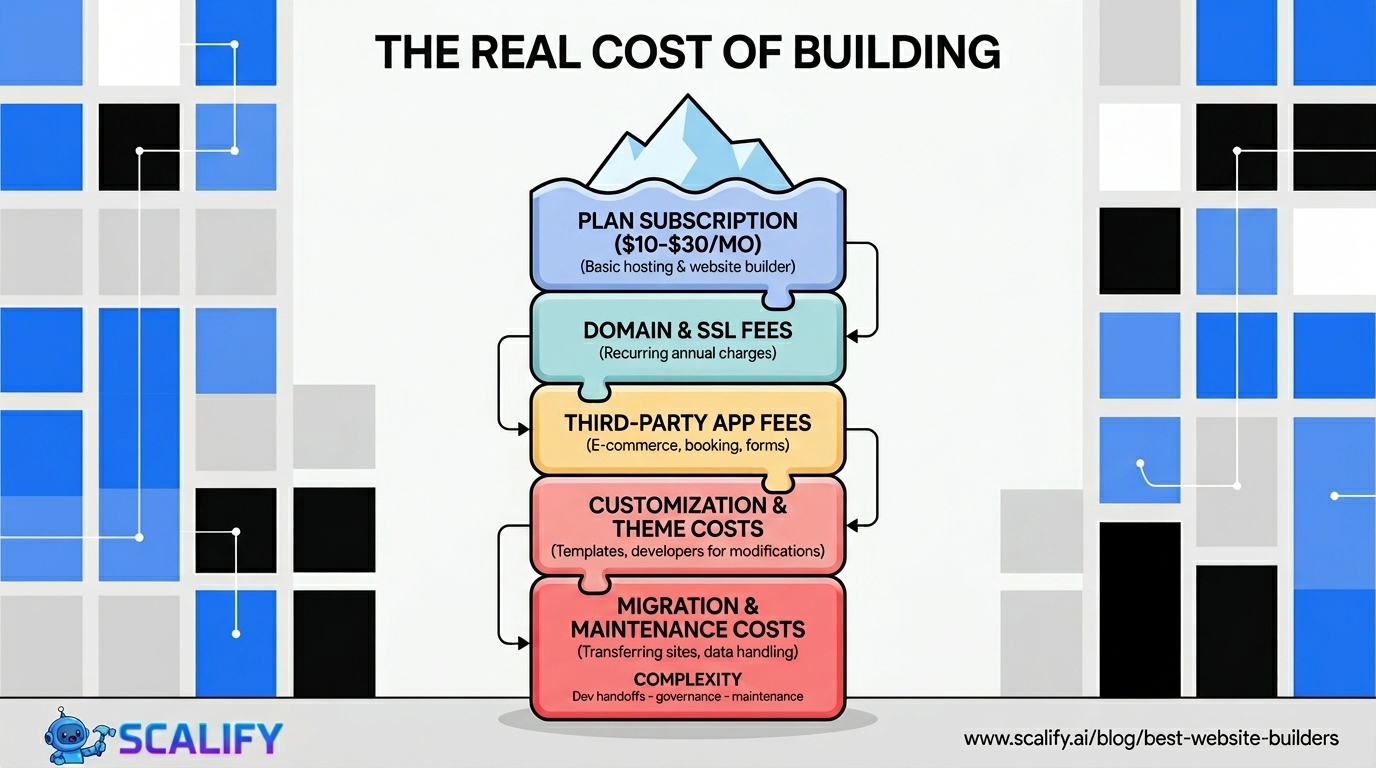
- Every platform has hidden costs: apps, domains, themes, developer time, migration friction. Plan on 2–3x the advertised price for a real business site over a year.
The Honest Truth About "Best Website Builder" Lists
Every platform on this list can build a good website for the right use case. The real question isn't "which is best?" — it's "which fits what I'm actually trying to do?"
We build on Webflow because we've tested every platform on this list, and Webflow consistently delivers the best balance of design quality, SEO performance, and long-term flexibility for the small and mid-sized businesses we serve. But if you're a photographer, Format is the right answer. If you're selling products, Shopify is the right answer. If you need a newsletter, Ghost is the right answer.
If you're not sure which platform fits your business, you have two good options:
- Try the free plans of your top two choices for a weekend each. You'll know within 48 hours.
- Work with a professional website builder (like Scalify.ai) that evaluates your actual needs and delivers a finished site on the right platform in 10 business days — so you can skip the research phase entirely.
Either way, pick a platform that matches where your business is going, not just where it is today.
Sources & Methodology
Market share figures cited in this article come from multiple sources, each with different methodologies:
- W3Techs — tracks detected technology usage across the top 10M websites.
- Site Builder Report, Jan 2026 — focuses on DIY/hosted website builder market share.
- Colorlib, March 2026 — Core Web Vitals and growth data.
- WPZOOM, April 2026 — WordPress market share data.
- WordPress.org Plugin Directory — official plugin count.
Pricing figures come directly from each platform's official pricing page, linked inline. Pricing shifts frequently — verify current rates at each vendor's site before deciding.





























































.jpeg)


.jpeg)


































78 SW 7th St, Miami, FL 33130


