


How to Get Featured Snippets for Your Website (2026 Guide)
By Josh Ternyak

April 18, 2026
Featured snippets appear in 12.3% of searches and earn 35% of clicks. This comprehensive guide covers snippet types (paragraph, list, table, video), the 4-step targeting process, optimization checklist, common mistakes, zero-click search concerns, tracking wins and losses, featured snippets vs AI Overviews in 2026, and building a long-term systematic featured snippet acquisition strategy.
How to Get Featured Snippets for Your Website
Featured snippets are the answer boxes that appear at the top of Google's search results, above the organic listings — what SEOs call "Position 0." They display a direct answer to a query pulled from a specific web page, often accompanied by the page's URL and title. Capturing a featured snippet for a high-volume query can dramatically increase organic traffic — the snippet position typically earns 20–35% of all clicks for that query, often more than the #1 organic result below it.
Featured snippets are not random. Google selects snippet content based on specific criteria: the page must already rank on the first page for the query, the content must directly and concisely answer the question, and the content format must match what Google expects for that query type. Understanding these criteria and structuring content specifically to meet them is how high-quality pages consistently win snippets for their target queries.
Key Featured Snippet Statistics
Types of Featured Snippets and How to Target Each
Snippet Type% of SnippetsTriggered ByHow to TargetParagraph snippet~70%"What is," "How does," "Why" queriesWrite a concise 40–55 word definition or explanation directly after an H2 matching the queryNumbered list snippet~10%"How to," "Steps to," "Ways to" queriesUse numbered lists with H3 headers for each step; 5–10 items is typicalBulleted list snippet~9%"Types of," "Examples of," "Best X" queriesUse unordered lists with clear, parallel items; each item should stand aloneTable snippet~6%Comparison queries, "X vs Y," pricing, dataUse proper HTML tables with clear headers; data should be scannable and comparativeVideo snippet~5%"How to" queries where demonstration adds valueYouTube videos with accurate timestamps and transcripts; embed on relevant page
The Snippet Targeting Process
Step 1: Identify Snippet Opportunities
Not all queries have featured snippets — focus efforts on queries that currently show a snippet (meaning Google wants to provide a direct answer) where you rank on page 1. The easiest wins are queries where you already rank positions 1–5 and a competitor holds the snippet. Use Semrush, Ahrefs, or Google Search Console to identify: queries where your page ranks positions 1–10, whether those queries currently have a snippet, and if so, who holds it.
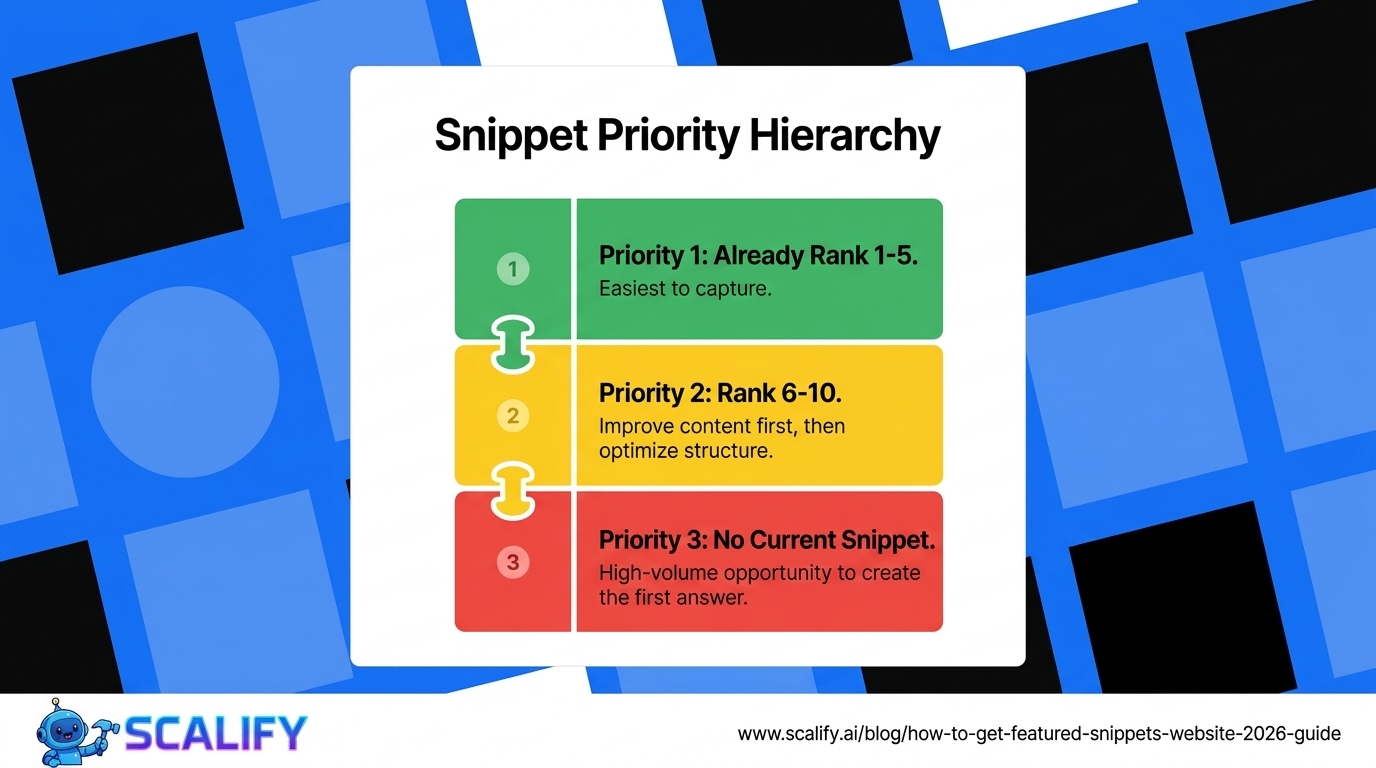
Priority targeting order: queries with existing snippets where you rank top 5 (easiest to win), queries with existing snippets where you rank positions 6–10 (improve content to move up then optimize for snippet), and high-volume question queries where no snippet currently exists (opportunity to create the snippet Google wants).
Step 2: Analyze the Current Snippet
Before optimizing for a snippet, understand what Google is selecting from the current snippet holder. Search the query and examine: how long is the snippet content (count the words), what format does it use (paragraph, list, table), what exact question does the first sentence answer, and where does the snippet content appear on the page (after which header). This analysis reveals the content format and directness that Google is rewarding — your goal is to provide a better version of the same structure.

Step 3: Restructure Content for Snippet Eligibility
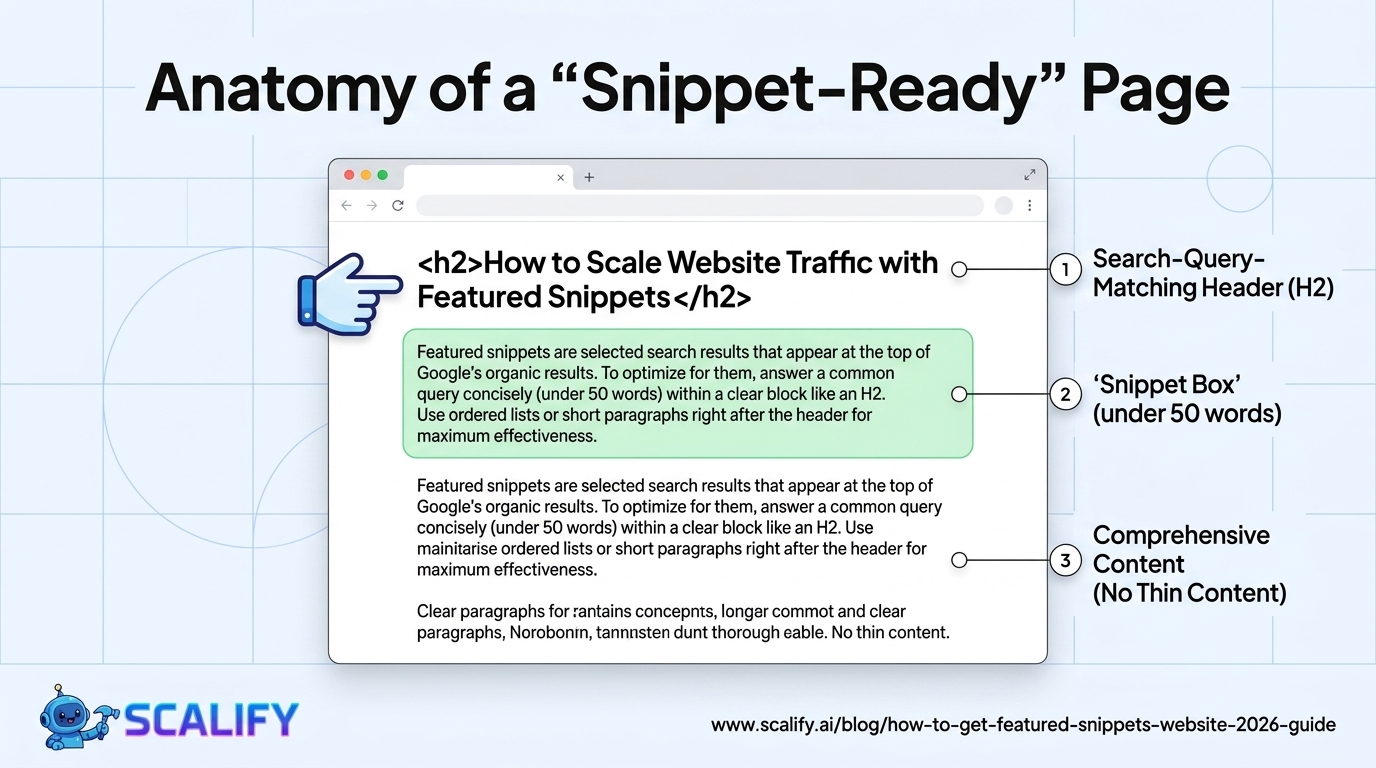
For paragraph snippets: add an H2 or H3 heading that matches the exact search query, immediately follow it with a 40–55 word paragraph that directly and completely answers the question in the first sentence, use simple declarative language without assuming prior knowledge, and avoid starting with "I," "we," or the brand name.
For list snippets: add an H2 matching the query (e.g., "How to Create an SEO-Friendly URL Structure"), follow with a brief introductory sentence, then an H3-formatted numbered or bulleted list where each item is clear and parallel. Keep list items to 10 or fewer — Google typically displays 8 items in list snippets and adds "More items" for longer lists.
For table snippets: structure the data in a proper HTML table with header row, clear column labels, and data that lends itself to comparison. The table should be the direct answer to the query — if someone searches "web developer salary by state," a properly formatted table of state-by-state salaries is the ideal snippet content.
Step 4: Optimize the Surrounding Content
Snippet-targeted content performs better when it's surrounded by comprehensive coverage of the topic. A page that only contains the 50-word snippet answer and nothing else signals thin content — Google prefers pages that comprehensively cover a topic and answer the quick query as part of that comprehensive coverage. The snippet answer should be a concise, immediate answer to the question, with more detailed explanation and context following in the body of the page.
Snippet Optimization Checklist
ElementOptimizationSnippet TypeHeader tag matching queryH2 or H3 that exactly or closely matches the search queryAll typesImmediate answerFirst sentence directly answers the question — no preambleParagraph, listAnswer length40–55 words for paragraphs; 4–10 items for listsAll typesPlain languageNo jargon; assume the reader has no prior knowledgeAll typesProper HTML structureSemantic HTML: h2/h3, ol/ul, table elements — not styled divsAll typesPage already ranking page 1Cannot win snippet without page 1 rankingAll typesContent comprehensivenessSnippet content embedded in comprehensive topic coverageAll types
Featured Snippets and Zero-Click Searches
The major concern about featured snippets is zero-click searches — where users get their answer directly from the snippet without clicking through to the website. This is a real phenomenon: snippets designed to fully answer a question in 50 words can satisfy the user's need without requiring a click. However, the data on snippet click-through rates is nuanced: while some snippet queries produce significant zero-click rates, snippets overall still drive more clicks than the #1 organic position without a snippet — because the snippet's prominence generates trust and brand exposure that produces clicks from users who want more than the quick answer.
The queries most likely to produce zero-click behavior: simple factual queries ("capital of France," "definition of X") where the complete answer fits in 50 words. The queries most likely to produce snippet clicks: process queries ("how to set up X"), comparison queries, queries where the snippet reveals enough to create curiosity for more. Targeting snippets for process and comparison queries where the answer naturally leads to wanting more detail produces click-through rates closer to traditional organic rankings.
Tracking Snippet Wins and Losses
Monitoring snippet performance requires checking which queries your pages currently hold snippets for and tracking whether snippet wins produce the expected traffic uplift. Semrush's Position Tracking feature tracks snippet position over time. Ahrefs' Site Explorer shows current snippet ownership. Google Search Console doesn't explicitly label featured snippets but shows position 1 rankings that significantly outperform their expected CTR — a signal that the snippet is likely driving above-average clicks for that query.
When a snippet is lost to a competitor, the recovery process: analyze what the competitor's snippet content does differently, update your content to match or exceed that structure, and resubmit the updated URL to Google Search Console for faster re-crawling. Snippet positions are not permanent — they're updated frequently as Google recrawls pages and evaluates new content against snippet criteria. This volatility means both that winning snippets requires ongoing optimization and that recovering lost snippets is typically achievable within 4–8 weeks of quality content updates.
The Bottom Line
Featured snippets are won through deliberate content structuring — not luck or domain authority alone. Pages already ranking page 1 can win snippets by adding headers matching the search query, immediately followed by concise, direct answers in the correct format (paragraph 40–55 words, numbered/bulleted lists 4–10 items, tables for comparison data). The process is systematic: identify snippet opportunities among your current page-1 rankings, analyze the current snippet holder's structure, improve your content to directly and concisely answer the question in the appropriate format, and monitor performance in the following 2–8 weeks. Featured snippets compound your SEO investment — capturing position 0 traffic on top of your existing page 1 rankings without requiring additional backlinks or additional content creation.
At Scalify, we structure all blog content for featured snippet eligibility — direct answers, proper HTML structure, and concise formatting that gives every article the best chance of capturing position 0.
Top 5 Sources
Common Featured Snippet Mistakes
Optimizing for snippets before ranking page 1. The single biggest featured snippet mistake is spending time on snippet optimization for queries where the page doesn't yet rank on the first page. 99.58% of snippet pages are already page 1 results — Google won't pull a snippet from a page on page 3, regardless of how well the content is structured for it. Fix the ranking problem first; optimize for snippets only for queries where you already rank positions 1–10.
Over-verbose answers. The ideal snippet answer is 40–55 words — complete but concise. Answers that ramble past 100 words are unlikely to be selected as snippets because Google wants to display a complete, direct answer in the limited real estate of the snippet box. Review every potential snippet answer in your content: if it takes more than 60 words to answer the core question, it's too long. Trim to the essential answer and put the additional detail in the following paragraphs.
Not matching the query format exactly. If the search query is "how to create an email newsletter," the header should be "How to Create an Email Newsletter" and the answer should be a numbered list — because Google expects step-by-step instruction for "how to" queries. Writing a paragraph answer for a "how to" query is mismatching format to intent. Study the snippet format currently appearing for your target query and match it.
Burying the answer. Some pages have the correct information but bury it in the middle of long paragraphs after extensive preamble. Google's snippet algorithm looks for the direct answer immediately following a relevant header. Restructure content so the most direct answer to the query appears as the first sentence after the matching header — not after three paragraphs of context.
Featured Snippets vs. AI Overviews: 2026 Context
Google's AI Overviews (previously called Search Generative Experience) have introduced a new layer above featured snippets in search results. AI Overviews synthesize answers from multiple sources and may include citations — potentially reducing the visibility of individual featured snippets for some query types. The relationship between AI Overviews and featured snippets is still evolving, but several patterns have emerged: AI Overviews most commonly appear for complex multi-part queries; simple direct-answer queries often still trigger traditional featured snippets; and pages that are cited in AI Overviews tend to be authoritative, comprehensive pages that would also rank well for featured snippets. The same content quality and structure that wins featured snippets — comprehensive, credible, directly answering the query — also positions pages well for AI Overview citation. The optimization approach is consistent: build genuinely authoritative, clearly structured content that directly answers the questions users ask.
Long-Term Featured Snippet Strategy
Featured snippet acquisition is most productive when approached as a systematic editorial priority rather than an ad hoc optimization. A content team that reviews Search Console quarterly for high-impression, question-format queries where the site ranks positions 2–10, then specifically rewrites or restructures those pages to target the snippet, produces compounding results over 12–18 months as the portfolio of snippet-optimized content grows. A website that holds 20 featured snippets is generating above-normal click-through rates across 20 different queries simultaneously — and the traffic from those 20 positions grows as the individual queries' search volume grows. Treating snippet acquisition as a systematic content improvement practice rather than a one-time checklist item is what produces the long-term compounding SEO benefit that makes featured snippets worth the specific optimization investment.






























































.jpeg)


.jpeg)

































78 SW 7th St, Miami, FL 33130


