


Website Security Statistics: Hacks, Breaches, and Vulnerabilities (2026)
By Josh Ternyak

April 17, 2026
A website is attacked every 39 seconds on average. This data-heavy guide covers the most important website security statistics for 2026 — including hack rates, breach costs, vulnerability data, CMS-specific risks, and what the research shows about small business cyber exposure.
Key Statistics: Website Security in 2026
The Scale of the Website Security Problem
Website security is one of the most underappreciated business risks for small and medium-sized businesses. The common mental model — that hackers target big companies and that small websites are too obscure to be worth attacking — is demonstrably false. The reality is that the majority of website attacks are automated, using botnets and vulnerability scanners that probe every IP address on the internet regardless of the site's size, traffic, or apparent commercial value.
A small local restaurant website running an outdated WordPress installation is not below the radar of automated attack scripts. Those scripts don't care about the restaurant. They care about gaining access to a server, injecting malware, enrolling the server in a botnet for future attacks, or serving malicious content to the site's visitors. The attack economics have changed completely — it costs essentially nothing to scan a million websites for a specific vulnerability. The marginal cost of attacking one more site is approximately zero.
Understanding the scale and nature of the website security threat environment is the prerequisite for understanding why the statistics are so troubling — and what they mean for website owners trying to protect themselves.
Daily, Monthly, and Annual Website Attack Statistics
TimeframeWebsites HackedBreach AttemptsNew Malware SamplesPer second~0.35~2,244~7Per minute~21~134,640~450Per hour~1,250~8 million~27,000Per day~30,000~194 million~450,000Per year~10.95 million~71 billion~164 million
Most Common Website Attack Types
Attack Type% of Website AttacksPrimary TargetTypical GoalSQL Injection~22%Forms, login pages, URLsDatabase access, data theftCross-Site Scripting (XSS)~18%Input fields, comment sectionsCredential theft, redirectionBrute Force / Credential Stuffing~16%Login pages, admin panelsAccount takeoverDDoS Attacks~12%Any websiteTakedown, extortion, distractionPlugin/Extension Vulnerabilities (CMS)~11%WordPress, Joomla, DrupalCode injection, backdoorPhishing (hosted on compromised sites)~9%Any website with server accessCredential harvestingMalware injection~8%E-commerce, lead gen sitesCredit card skimming, data theftFile inclusion vulnerabilities~4%PHP-based websitesRemote code execution
CMS-Specific Security Statistics
CMS PlatformMarket Share% of Hacked CMS SitesPrimary Vulnerability TypeWordPress43.3%96.2%Outdated plugins, weak passwordsJoomla1.8%2.1%Extension vulnerabilitiesDrupal1.5%0.8%Core vulnerabilities, misconfigurationsMagento0.7%0.6%Payment card skimming, outdated versionsAll others~52.7%0.3%Various
WordPress's outsized share of CMS-related hacks (96.2% of CMS infections despite 43.3% market share) reflects several structural realities about the WordPress ecosystem rather than WordPress core being fundamentally less secure than alternatives. WordPress core itself is updated regularly and maintained by a large security team. The vulnerability surface lies primarily in the vast plugin ecosystem — over 60,000 plugins in the official repository, many maintained by individual developers with varying security practices — and in the millions of WordPress sites running outdated software.
Research by Sucuri (a website security firm) consistently identifies outdated plugins as the primary attack vector for WordPress sites. A plugin that was last updated in 2021 may have known, publicly documented vulnerabilities that automated attack scripts specifically target. The security calculus is straightforward: if a plugin has 500,000 installations and a known vulnerability, a single automated script can attempt to exploit all 500,000 sites in hours.
WordPress Vulnerability Breakdown
Vulnerability Source% of WordPress HacksOutdated or vulnerable plugins52%Weak or compromised passwords21%Outdated WordPress core15%Insecure hosting environment8%Outdated or vulnerable themes4%
The Financial Cost of Website Breaches
Breach Cost CategoryAverage CostNotesAverage total data breach cost$4.88 millionIBM 2024 report; all organization sizesSMB data breach cost$255,000 averageSmaller organizations, proportionally devastatingAverage ransomware payment$812,0002023 average; rose sharply in 2023–2024Website downtime cost (e-commerce)$5,600/minuteGartner estimate for average e-commerce downtimeWebsite recovery cost after hack$4,200 – $15,000Professional remediation for SMB siteAverage cost of malware removal (DIY)$1,000 – $3,000Time cost + tool cost estimateBrand reputation damage (long-term)~15% customer lossBrightLocal consumer trust survey
For small businesses, the $255,000 average breach cost is particularly alarming because it frequently exceeds what small businesses have in reserves or insurance coverage. Research by the National Cyber Security Alliance found that 60% of small businesses that suffer a major cyberattack close within 6 months. The combination of direct remediation costs, lost revenue during downtime, regulatory fines in relevant jurisdictions, and customer loss creates a financial burden that many small businesses cannot survive.
Website Security by Industry: Risk Profiles
IndustryAttack FrequencyPrimary RiskNotable StatHealthcareVery HighPatient data, PHIAvg breach cost: $10.9M (highest)Finance / BankingVery HighFinancial data, credentialsAvg breach cost: $6.1ME-Commerce / RetailHighPayment card dataCard skimming on 1 in 50 online storesEducationHighStudent records, research data89% of education org's breached in 2023GovernmentHighCitizen data, infrastructureNation-state attacks growingSmall Business (general)Moderate-HighCustomer data, financial info43% of all attacks target SMBsNon-ProfitModerateDonor data, financial recordsOften least protected
The Vulnerability Timeline: How Long Sites Stay Exposed
One of the most troubling dimensions of website security statistics is the time dimension — how long vulnerabilities exist before they're discovered, exploited, patched, and cleaned up:
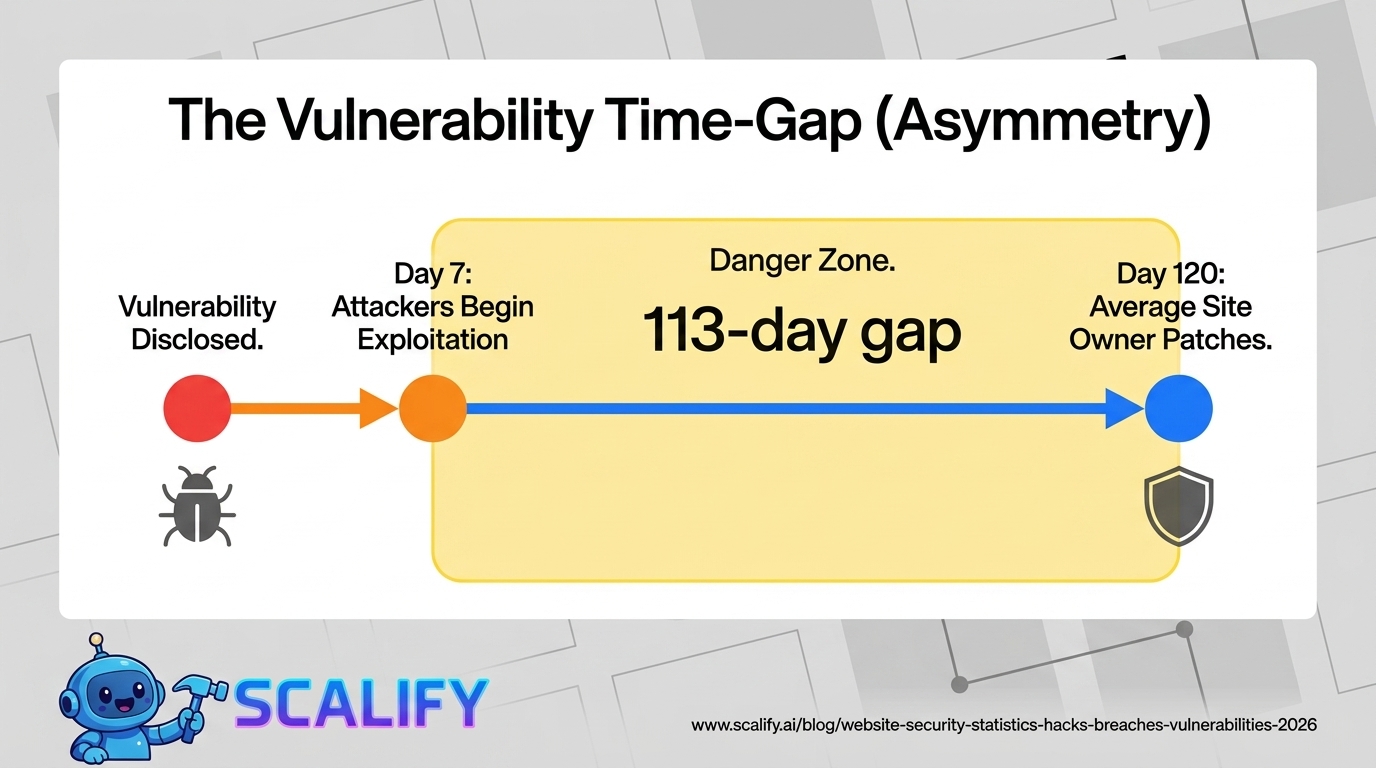
StageAverage TimeSourceVulnerability discovered by researchers—Starting pointTime to public disclosure after discovery~68 daysNational Vulnerability DatabaseTime for attackers to begin exploiting after disclosure~7 daysRapid7 Vulnerability IntelligenceTime for typical website owner to apply patch~30–120 daysSucuri / Wordfence dataAverage time a site is infected before detection~56 daysGoogle Transparency ReportAverage time to full breach remediation~277 daysIBM Cost of a Data Breach Report
The timeline reveals a fundamental asymmetry: attackers can begin exploiting a disclosed vulnerability within 7 days, while the average website owner takes 30–120 days to apply the relevant patch. This gap — sometimes measured in months — is the window during which millions of websites are exposed to known, documented vulnerabilities that have available patches.
The 56-day average infection period before detection is particularly consequential for website owners. A compromised website often continues serving malicious content to its visitors — credit card skimmers, phishing pages, malware downloads — for nearly two months before anyone notices. During this period, the site is actively harming the visitors who trust it, generating liability for the business owner, and accumulating blacklist entries that damage search rankings.
SSL/HTTPS Adoption Statistics
CategoryHTTPS Adoption RateNotesTop 1 million websites (Alexa)~91%Near-universal at high traffic endAll indexed websites~72%Including long tailSmall business websites specifically~32%Huge gap vs. large sitesE-commerce sites (checkout pages)~96%Payment processor requirementGoogle Chrome HTTPS traffic~95%% of Chrome page loads via HTTPS
The 32% HTTPS adoption rate among small business websites is striking in the context of Google's 2014 announcement that HTTPS was a ranking factor. Despite years of free SSL certificates through Let's Encrypt, hosting provider SSL integrations, and browser warnings for HTTP sites, a large majority of small business websites still operate without SSL. This creates both a security risk (data transmitted unencrypted) and an SEO disadvantage (Google's ranking factor penalty for non-HTTPS sites).
What Happens After a Website Is Hacked
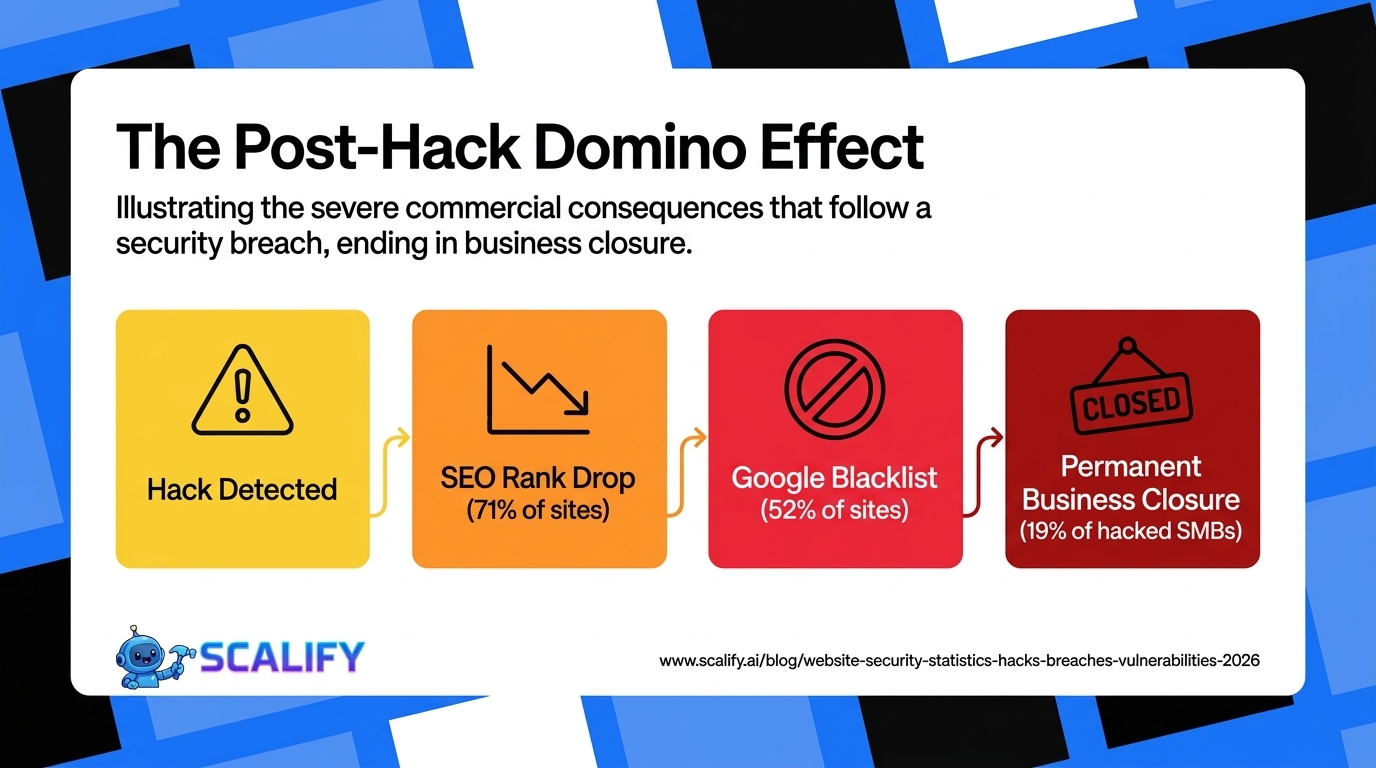
Consequence% of Hacked Sites Experiencing ThisGoogle search ranking drop71%Added to Google Safe Browsing blacklist52%Customer data exposed43%Hosting account suspended38%Malware distributed to site visitors36%Spam emails sent from domain31%Permanent search ranking damage28%Business closed within 12 months19%
The search ranking consequences of a website hack are among the most commercially damaging and least discussed. Google's Safe Browsing database flags websites distributing malware or hosting phishing content, and browsers display full-page warnings to users attempting to visit flagged sites. Being blacklisted by Google Safe Browsing effectively eliminates organic search traffic until the site is cleaned and the blacklist entry removed — a process that typically takes 1–4 weeks even after the malware is removed, as Google re-crawls and verifies the cleanup.
Small Business Website Security: The Protection Gap
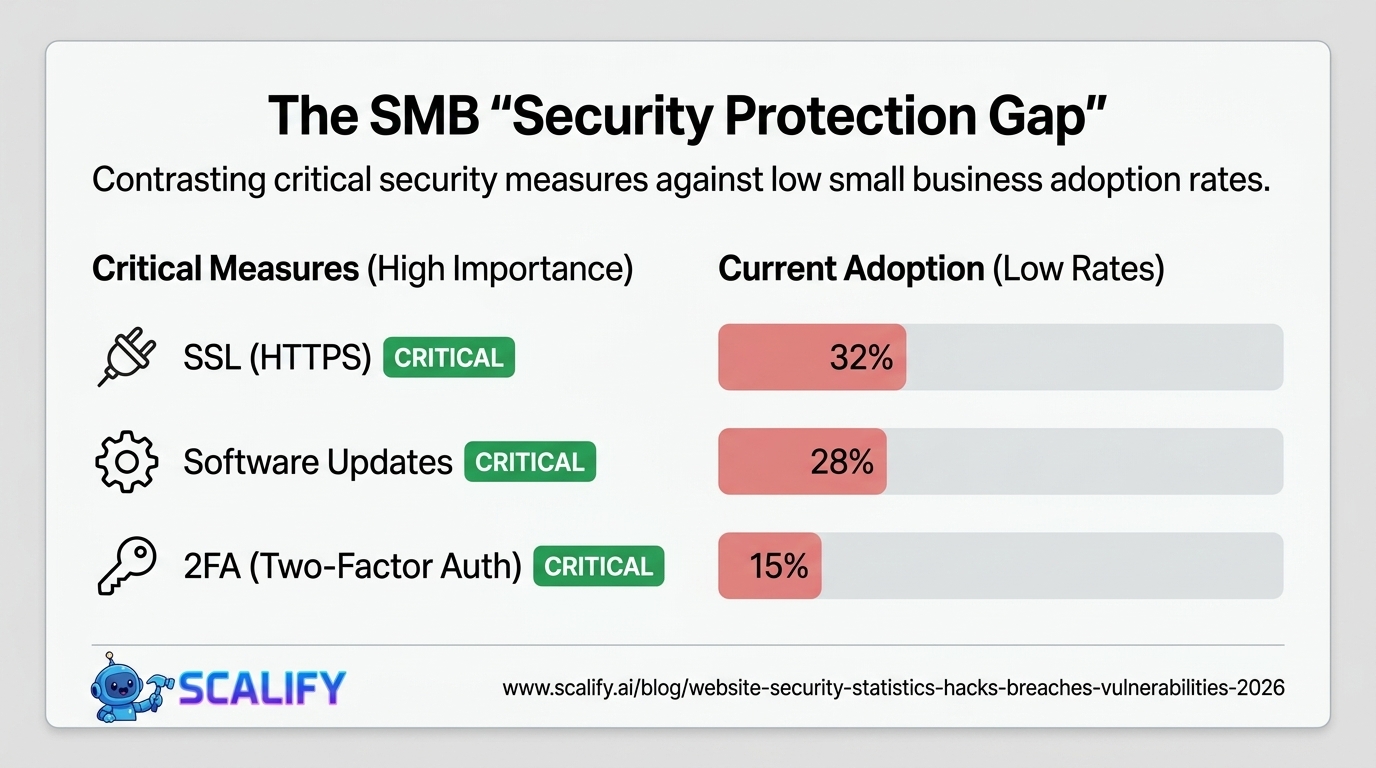
Security Measure% of Small Businesses ImplementingImportance LevelSSL certificate (HTTPS)32%CriticalRegular software/plugin updates28%CriticalRegular backups36%CriticalSecurity plugin / WAF19%HighStrong password policy41%HighTwo-factor authentication on CMS15%HighRegular security scanning12%HighEmployee security training22%Medium-High
These numbers reveal a severe security protection gap at the small business level. Only 19% of small businesses use a web application firewall on their site, only 15% require two-factor authentication for CMS access, and only 12% run regular security scans. Against an attack environment where 30,000 websites are compromised daily, these protection rates are dangerously low.
The most actionable security investment is also the lowest-barrier one: keeping software updated. The 52% of WordPress hacks that come from outdated plugins are almost entirely preventable with automatic update settings or a weekly manual update routine. This is not a cost issue — WordPress updates are free. It's an attention and awareness issue that security education can directly address.
The Rise of Automated Attacks: Why Every Website Is a Target
Perhaps the most important conceptual shift in understanding website security statistics is the automation dimension. In the early days of the web, hacking required skilled human attackers who chose targets deliberately. In 2026, the vast majority of website attacks are fully automated — botnets scanning billions of IP addresses looking for specific vulnerability signatures, with no human decision involved in targeting individual sites.
Shodan (a search engine for internet-connected devices) indexes vulnerable servers and websites continuously. Tools like Metasploit and SQLMap have automated exploitation of common vulnerabilities. The Mirai botnet and its successors have demonstrated that networks of hundreds of thousands of compromised devices can be assembled and directed with minimal ongoing human involvement.
The practical implication: no website is "too small" to be attacked, because the attack economics have removed the targeting decision entirely. The only question is whether your website presents a vulnerability that automated scripts can exploit. If it does, it will be exploited — the timeline question is when, not if.
Security Investment vs Security Outcome
Security MeasureAnnual CostRisk ReductionROI ContextSSL certificate (Let's Encrypt)$0Eliminates data interception riskHighest ROI possibleAutomatic software updates$0Eliminates 52% of WordPress hack vectorExtremely high ROITwo-factor authentication$0Eliminates brute-force/credential riskExtremely high ROISecurity plugin (Wordfence/Sucuri)$99 – $299/yrFirewall, scanner, monitoringHigh ROI vs $4,200+ cleanup costDaily offsite backups$60 – $120/yrRecovery insurance against all attacksEssential — priceless in recoveryManaged security hosting$30 – $100/moServer-level protection, monitoringStrong ROI for higher-traffic sites
The security investment math is unusually clear. The most impactful security measures — SSL certificates through Let's Encrypt, automatic updates, two-factor authentication — cost nothing. The paid security tools (security plugins, quality hosting) cost $200–$1,500/year. Against an average hack remediation cost of $4,200–$15,000 for a small business website, and the risk of the 19% of hacked businesses that close within 12 months, the security investment ROI is exceptional.
What Website Owners Should Do With This Data
The security statistics paint a picture of widespread vulnerability and insufficient protection. Translating the data into action:
Immediate priorities (zero cost): Enable automatic updates for WordPress core, themes, and plugins. Enable two-factor authentication on your CMS admin account. Ensure HTTPS is active on all pages (free via Let's Encrypt through most hosting providers). Change default admin usernames from "admin" to something unique.
Low-cost priorities ($100–$300/year): Install a security plugin with Web Application Firewall capability (Wordfence Premium or Sucuri). Set up automated daily off-site backups. Run a malware scan immediately to verify the site isn't already compromised.
Ongoing practice: Audit installed plugins quarterly — remove any not actively needed, as unused plugins are a vulnerability surface with no compensating benefit. Monitor Google Search Console for manual actions or security notifications. Subscribe to security notifications for the plugins you use.
At Scalify, the websites we build are constructed with security as a foundational requirement — proper HTTPS configuration, minimal plugin footprint, clean code, and hosting recommendations that include managed security. Because a website that gets hacked doesn't just fail technically — it fails the business it was built to serve.
Top 5 Sources






























































.jpeg)


.jpeg)

































78 SW 7th St, Miami, FL 33130


