


How to Do a Website SEO Audit in 30 Minutes (2026 Checklist)
By Josh Ternyak

April 18, 2026
A complete 30-minute website SEO audit using free tools: Google Search Console for crawl errors and performance, Screaming Frog for technical issues, PageSpeed Insights for Core Web Vitals, on-page fundamentals for key pages, backlink analysis, and competitor gap identification. Includes common audit findings and fixes, prioritization framework, audit frequency guide, and special e-commerce SEO considerations.
How to Do a Website SEO Audit in 30 Minutes (2026 Checklist)
A website SEO audit identifies the technical issues, content gaps, and optimization opportunities that are limiting your organic search performance. Done properly, an audit produces a prioritized action list where each item is tied to a specific, fixable problem — not a generic laundry list of SEO best practices that may or may not be relevant to your specific site. This guide walks through a complete SEO audit you can complete in 30 minutes, covering the most impactful checks without requiring specialized SEO tools or technical expertise.
What You'll Need
The 30-Minute SEO Audit Checklist
Minutes 0–5: Google Search Console Check
Start with Search Console because it gives you direct data from Google about how your site is performing. Check these specific reports:
Search Console ReportWhat to Look ForRed FlagsCoverage → ErrorsPages with crawl errors (404, redirect errors, server errors)Any pages with Error status that should be accessibleCoverage → ExcludedPages excluded by noindex, canonical, or robots.txtImportant pages that shouldn't be excluded appearing hereCore Web VitalsLCP, INP, CLS status for desktop and mobileAny URLs in "Poor" or "Needs Improvement" statusPerformance → QueriesYour top-performing queries and pagesHigh impressions with very low CTR (under 2%) — title/description problemPerformance → PagesWhich pages generate the most clicksImportant pages with zero impressions — not indexed or too newLinks → External LinksSites linking to youVery few or zero external links — backlink opportunity
Minutes 5–10: Technical Crawl Check
Open Screaming Frog and crawl your site (or a sample of it for large sites). Filter the results for:
Issue to CheckFilter in Screaming FrogWhy It MattersPages returning 404 errorsResponse Codes → 4XXBroken pages waste crawl budget and create dead ends for usersRedirect chains (A→B→C)Response Codes → 3XX → Filter chainsEach redirect hop dilutes link equity; chains should be flattened to direct A→CMissing title tagsPage Titles → MissingTitle tag is the most important on-page SEO elementDuplicate title tagsPage Titles → DuplicateDuplicate titles confuse Google about which page to rankMissing meta descriptionsMeta Description → MissingNot a ranking factor but affects CTR in search resultsMissing H1 tagsH1 → MissingH1 signals page topic to search enginesImages without alt textImages → Missing Alt TextAccessibility requirement; Google Images ranking factorPages with no internal links pointing to themBulk Export → Crawl Data → Filter Inlinks = 0Orphaned pages are effectively invisible to both users and crawlers
Minutes 10–15: Page Speed Check
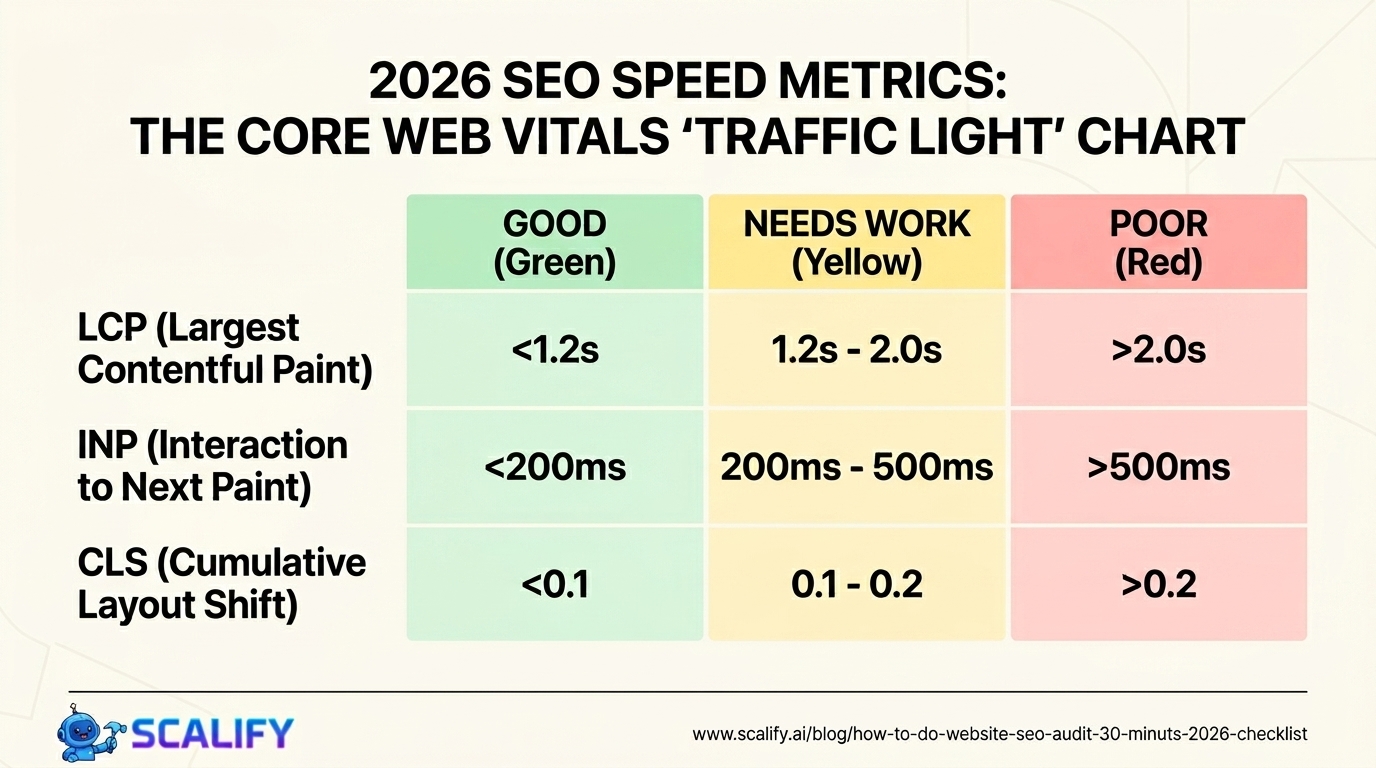
Run your homepage and your 2–3 most important landing pages through PageSpeed Insights (pagespeed.web.dev). Record the mobile scores and Core Web Vitals status for each. Target scores above 80 on mobile for each metric.
MetricGoodNeeds WorkPoorLCP (Largest Contentful Paint)Under 2.5s2.5–4.0sOver 4.0sINP (Interaction to Next Paint)Under 200ms200–500msOver 500msCLS (Cumulative Layout Shift)Under 0.10.1–0.25Over 0.25Overall Lighthouse Mobile Score80+50–79Under 50
For each page that fails or scores poorly, PageSpeed Insights provides specific recommendations. The most common issues to fix: images not in WebP format, images without explicit width/height attributes, render-blocking scripts, unused JavaScript, and no lazy loading on below-fold images.
Minutes 15–20: On-Page SEO Check
Manually review your 5 most important pages for on-page SEO fundamentals. For each page, check:
ElementBest PracticeCommon MistakeTitle tag50–60 characters; primary keyword near the beginning; compelling for clicksOver 60 characters (truncated in SERPs); keyword stuffing; generic ("Home")Meta description120–155 characters; includes keyword naturally; compelling CTAMissing entirely; over 155 characters; same as title tagH1 tagOne per page; includes primary keyword; describes page clearlyMultiple H1s; H1 doesn't match page topic; logo alt text as H1URL structureShort, lowercase, keyword-including, hyphens onlyParameters (?id=123); underscores; no keywords (/page-1/)Internal linksLinks to relevant related content on your site with descriptive anchor textNo internal links; "click here" anchor text; linking to homepage onlyImage optimizationDescriptive file names; alt text with keywords where naturalIMG_3456.jpg; no alt text; keyword-stuffed alt textContent depthComprehensively covers the topic; answers questions users haveThin content (under 300 words) on pages targeting competitive queries
Minutes 20–25: Backlink and Authority Check
In Ahrefs Webmaster Tools or Semrush's free tier, check your backlink profile:
Minutes 25–30: Competitor Gap Check
Choose your top 2–3 competitors and compare them to your site on these dimensions:
CheckMethodWhat to LearnDomain authority comparisonAhrefs/Semrush — compare DR/DAHow much authority gap needs to be closedTop ranking pagesSemrush → Domain Overview → Top PagesWhat content earns the most organic traffic for themKeyword gapsSemrush → Keyword Gap toolKeywords competitors rank for that you don't — content opportunitiesContent depth comparisonManual — compare your key pages to their top-ranking equivalentsWhere your content is thinner than what's rankingBacklink sourcesAhrefs → Link IntersectSites linking to competitors that don't link to you — outreach opportunities
Prioritizing the Issues Found
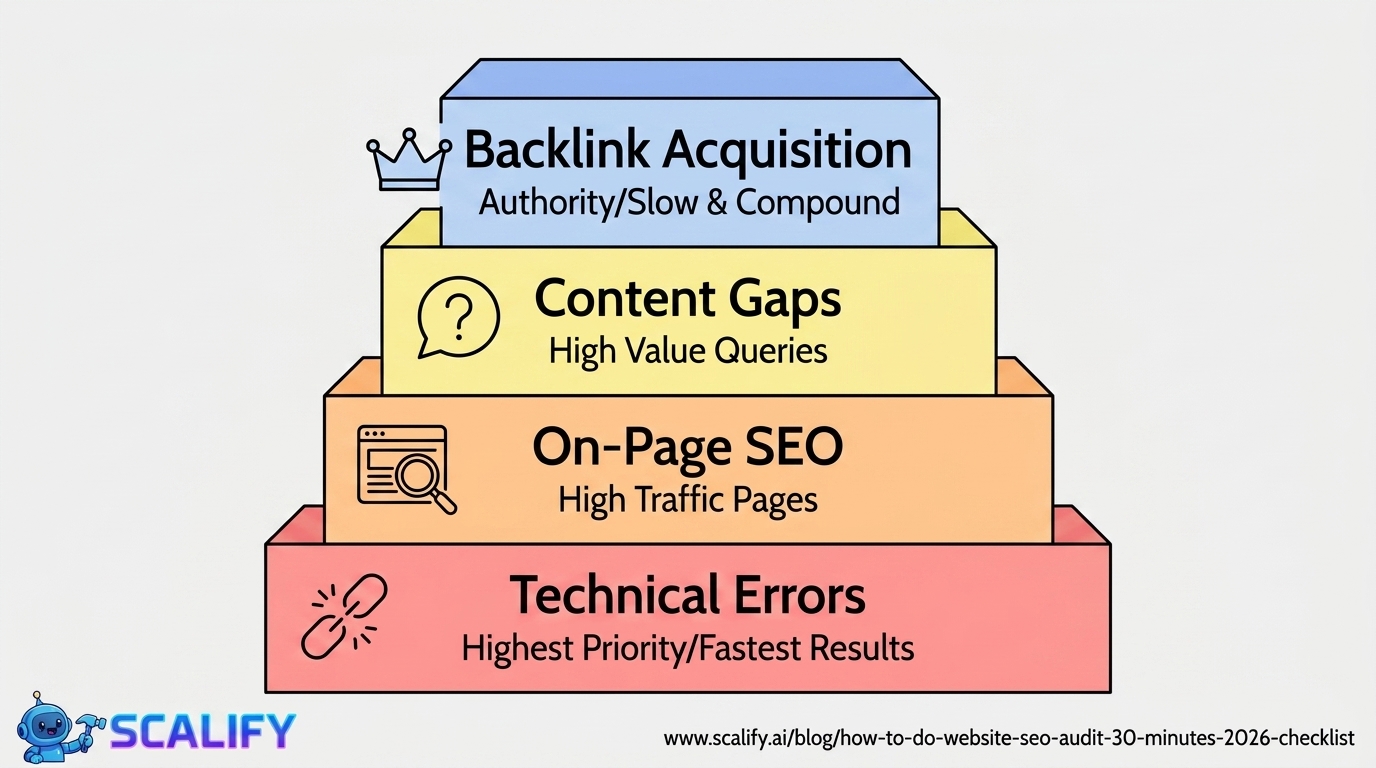
After completing the audit, you'll have a list of issues. Prioritize by this framework: fix technical errors first (broken pages, crawl errors, Core Web Vitals failures) because they prevent even well-optimized content from ranking; then fix on-page issues on your highest-traffic pages; then address content gaps for your highest-value queries; and finally work on backlink acquisition for the authority gap. Technical errors and on-page fixes produce faster results; content and backlinks are slower but compound over time.
How Often to Run an SEO Audit
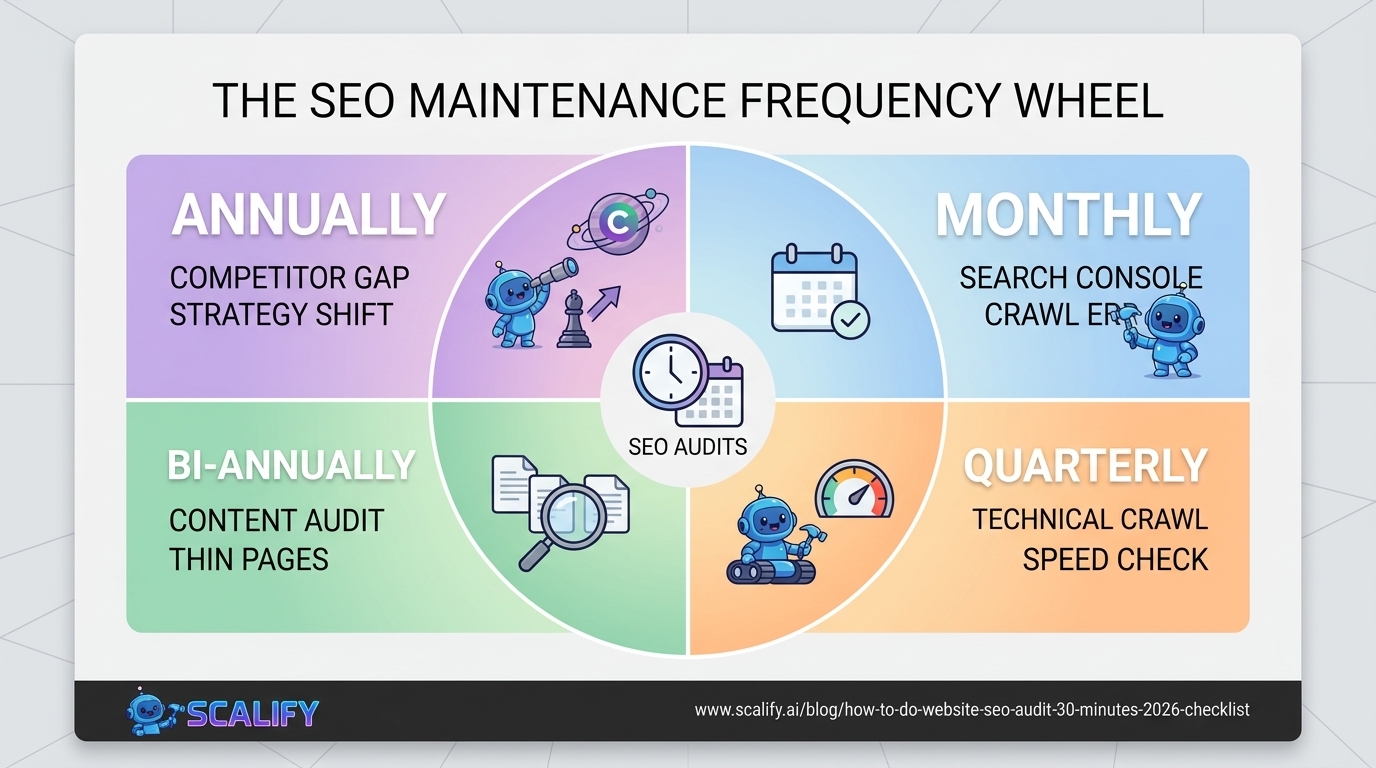
Audit TypeFrequencyWhat It CatchesQuick technical check (Search Console)MonthlyNew crawl errors, coverage changes, ranking dropsFull technical crawl (Screaming Frog)QuarterlyNew issues from content additions, site changesPerformance audit (PageSpeed Insights)Quarterly + after major updatesSpeed regressions from new code or contentContent audit (ranking + traffic review)Bi-annuallyContent needing updates, thin pages, cannibalizationCompetitor gap auditAnnually or when rankings shiftNew opportunities from competitor changes
The Bottom Line
A 30-minute SEO audit using free tools reveals the most impactful issues affecting your site's organic search performance. Prioritize in order: technical errors (broken pages, crawl issues), Core Web Vitals failures, on-page fundamentals on high-traffic pages, content depth gaps on target queries, and backlink acquisition. The audit creates a prioritized action list; consistent execution of that list over months is what produces ranking improvements — audits alone are worth nothing without the follow-through that turns findings into fixes.
At Scalify, every website we build passes an SEO audit at launch — proper title tags, meta descriptions, canonical tags, structured data, Core Web Vitals, and the technical SEO fundamentals that make every page rank-ready from day one.
Top 5 Sources
Common SEO Audit Findings and How to Fix Them
Across hundreds of website audits, the same issues appear repeatedly. Understanding the most common findings — and their fixes — lets you prioritize immediately when you find them:
Thin Content Pages
Thin content — pages with under 300–500 words of meaningful text — is one of the most common SEO problems on business websites. Category pages, tag archive pages, service pages that list offerings without explanation, and location pages created from templates with minimal unique content all qualify as thin. The fix depends on intent: consolidate thin pages that target the same topic into one comprehensive page (redirect the thin pages to the consolidated one), delete and 410 pages that have no traffic and serve no purpose, or expand thin pages with genuine, useful content that earns their place in the index. Google's algorithms have increasingly deprioritized thin content in favor of comprehensive pages that fully address a query — this is one of the highest-impact SEO improvements many sites can make.
Missing Schema Markup
Schema markup (structured data) helps Google understand what your content represents — a recipe, a product, an FAQ, a person, an organization — and enables rich results in search (star ratings, FAQ dropdowns, product prices displayed in search results). Most websites have no schema markup at all, missing a straightforward opportunity to improve both how search engines understand the content and how the pages appear in search results. The most valuable schema types for most businesses: LocalBusiness or Organization (for any business), FAQPage (for any page with Q&A format), Product (for e-commerce), Article (for blog posts), and BreadcrumbList (for navigation hierarchy). Schema can be implemented as JSON-LD in the page head — Google's recommended format — and validated with the Rich Results Test tool at search.google.com/test/rich-results.
Canonicalization Issues
Sites that are accessible at both www and non-www URLs, at both HTTP and HTTPS, or with and without trailing slashes often have duplicate content problems where Google indexes multiple versions of the same page, splitting the ranking signals between them. The fix is straightforward: choose your preferred URL format, implement a server-level redirect from all alternative formats to your preferred one, and add a self-referencing canonical tag to every page pointing to the preferred version. This canonicalization work is often worth 10–20% ranking improvements for pages that were splitting signals across multiple URL versions — one of the highest-ROI technical SEO fixes available.
Missing or Weak Internal Linking
Internal links distribute link equity from your high-authority pages to your lower-authority pages and signal to Google which pages on your site are most important. A common pattern: the homepage has significant authority from backlinks, but important service pages or product pages have few internal links pointing to them and therefore receive little of that authority. The fix: conduct a link audit to find your high-authority pages (most backlinks), then add contextual internal links from those pages to your most commercially important pages that need authority support. Descriptive anchor text ("professional web design services" rather than "click here") helps Google understand what the linked page is about — improving relevance signals in addition to authority flow.
SEO Audit for E-Commerce Sites: Special Considerations
E-commerce sites have specific SEO audit requirements beyond the general checklist. The most important additional checks:
Filter and parameter URL management. E-commerce sites generate thousands of URL variants from faceted navigation (color, size, price filters). Without canonical tags or noindex directives on these parameter URLs, they can flood Google's index with near-duplicate content, waste crawl budget on pages that will never rank, and dilute authority from category pages. Check that your most-visited filtered URLs either have canonical tags pointing to the main category URL or are excluded from indexing via robots.txt.
Product page thin content. Product pages with only a manufacturer description (duplicated across dozens of other e-commerce sites), no unique description, no user reviews displayed, and no supplementary content are likely competing in search against sites with more comprehensive product information. Adding unique product descriptions, implementing review schema, and creating supplementary content around product use cases dramatically improves product page performance in organic search.
Pagination and category depth. Category pages on page 5, 10, or 20 of a paginated series typically receive little crawl attention and no backlinks. Use rel="next" and rel="prev" pagination signals where supported, and consider whether deep pagination pages should be consolidated, excluded from indexing, or significantly improved with unique introductory content that justifies their indexed status.





























































.jpeg)


.jpeg)


































78 SW 7th St, Miami, FL 33130


