

.jpeg)
How to Use Ahrefs for Website SEO Research (2026 Guide)
By Josh Ternyak

April 17, 2026
Ahrefs is the most widely used SEO research tool for backlinks, keywords, and competitor analysis. This comprehensive guide covers all major features, 4 key workflows (competitor gap analysis, keyword research, backlink research, content audit), core metrics explained, free vs paid comparison, integrating Ahrefs into monthly workflow, advanced techniques (Content Explorer, SERP volatility, guest posting at scale), local SEO applications, and common mistakes to avoid.
How to Use Ahrefs for Website SEO Research
Ahrefs is the most widely used professional SEO research tool in the world — providing data on backlinks, keyword rankings, competitor analysis, and content opportunities that would take months to gather manually. Learning to use Ahrefs effectively is one of the highest-ROI skills available to anyone doing professional SEO work, because the platform surfaces insights that direct measurement can't reveal: why competitors are ranking above you, which content opportunities have the best traffic potential, and where your backlink profile has gaps relative to the sites you're trying to outrank.
Key Ahrefs Features and What They Do
FeatureWhat It DoesPrimary Use CaseSite ExplorerAnalyzes any website's organic traffic, backlinks, and top pagesCompetitor analysis; understanding your own site's performanceKeywords ExplorerKeyword research tool with search volume, difficulty, and SERP analysisFinding keywords worth targeting; difficulty assessmentSite AuditCrawls your website for technical SEO issuesTechnical SEO health check; identifying issues hurting rankingsContent ExplorerFinds the most-shared and most-linked content on any topicContent ideation; finding linkable content typesRank TrackerTracks your keyword rankings over timeMonitoring progress; identifying ranking dropsLink IntersectFinds sites linking to competitors but not to youLink building outreach listsBatch AnalysisAnalyzes multiple URLs or domains at onceBulk competitor comparison; link prospecting
Workflow 1: Competitor Keyword Gap Analysis
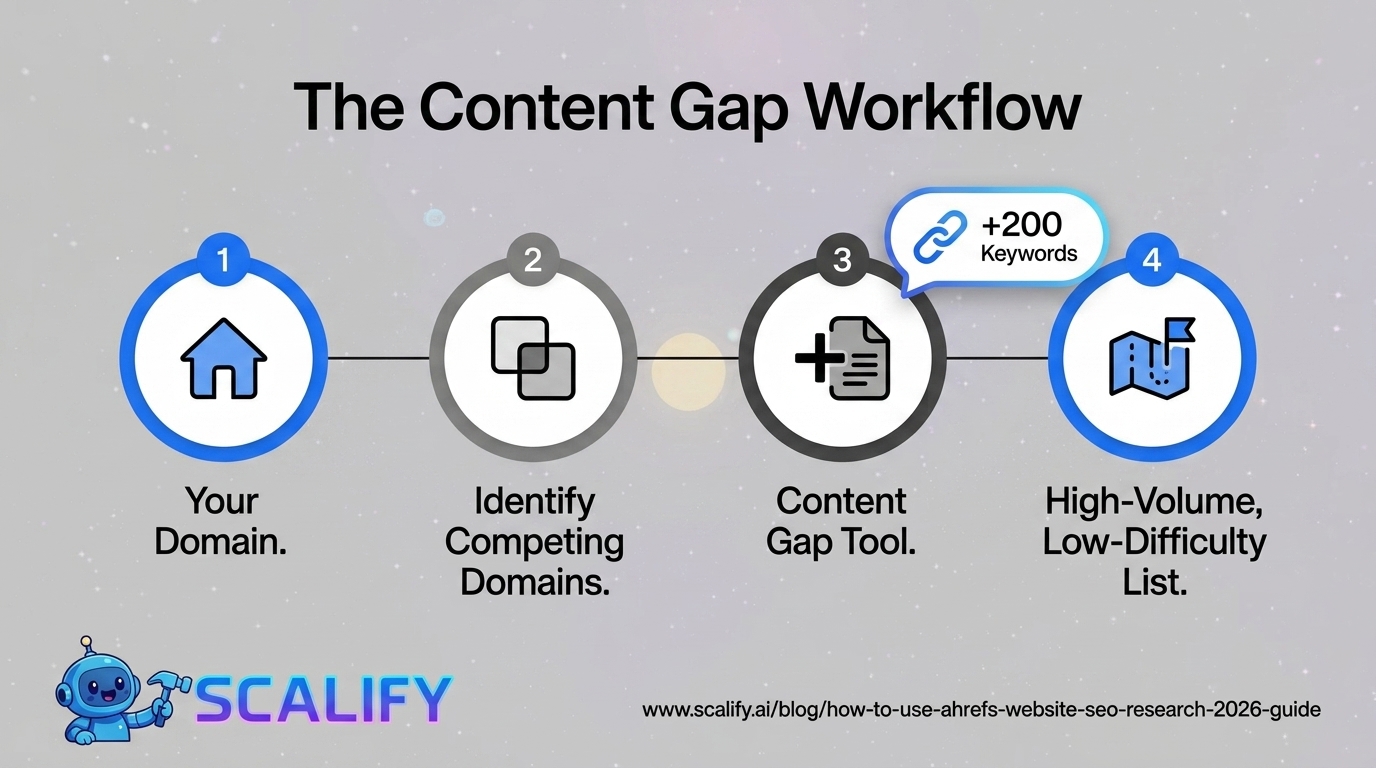
The competitor keyword gap analysis reveals which keywords your competitors rank for that you don't — providing a ready-made list of content opportunities worth pursuing. This is often the most immediately actionable use of Ahrefs for a site trying to grow organic traffic:
Step 1: Go to Site Explorer → enter your domain → click "Organic Keywords" to see what you currently rank for.
Step 2: Navigate to "Competing Domains" — Ahrefs shows which sites overlap most with your keyword rankings. These are your primary SEO competitors (which may differ from your business competitors).
Step 3: Go to Site Explorer → enter a competitor domain → "Organic Keywords" → export the list.
Step 4: Use the "Content Gap" tool (under Competitive Analysis) — enter your domain and up to 10 competitor domains. Ahrefs shows keywords competitors rank for that you don't, filtered by search volume and keyword difficulty. This list is your content roadmap: high-volume, low-difficulty keywords where competitors rank but you have no content are the clearest opportunities.

Workflow 2: Keyword Research for New Content
Ahrefs Keywords Explorer is the starting point for any planned content piece. The research process:
StepAction in AhrefsWhat to Learn1. Enter seed keywordKeywords Explorer → type primary topicSee search volume, KD (Keyword Difficulty), CPC2. Explore related keywordsClick "Related Terms," "Also Rank For," "Questions"Long-tail variations worth including; question-format snippets to target3. Assess SERP competitionClick "SERP Overview" for target keywordDR of ranking pages; types of content ranking; snippet opportunities4. Check Traffic PotentialLook at "TP" column rather than just search volumeActual traffic the #1 ranking page gets — better predictor than raw volume5. Evaluate Keyword DifficultyKD score + check "Referring Domains" requiredHow many backlinks needed to rank; realistic for your site?6. Check "Parent Topic"Ahrefs shows the broader keyword to optimize forWhether to target exact keyword or broader parent topic in one page
Workflow 3: Backlink Research and Link Building
Ahrefs' backlink data is widely considered the most comprehensive in the SEO industry — updated frequently and covering a larger index of the web than most alternatives. The most actionable backlink workflows:
Analyze your own backlink profile: Site Explorer → your domain → Backlinks. Review referring domains (how many unique sites link to you), anchor text distribution (over-optimized exact match anchors are a risk signal), lost backlinks (valuable links that were pointing to your site but are now broken — 404 redirect opportunities), and your most-linked pages (which content is earning links and why).
Link Intersect for outreach targets: Competitive Analysis → Link Intersect → enter 3–5 competitors. The tool shows sites linking to multiple competitors but not to you — these are high-probability link prospects because they're already linking to content similar to yours. Export this list and prioritize by Domain Rating (DR) to focus outreach on the most authoritative prospects.
Find broken link building opportunities: Enter a competitor or resource site in Site Explorer → Best by Links → check "HTTP 404" filter. These are pages that have earned significant backlinks but no longer exist — the sites linking to them may be receptive to a replacement suggestion. If you have (or can create) content covering the same topic, reaching out to sites linking to dead pages with a working alternative produces above-average response rates compared to cold outreach.
Workflow 4: Content Audit with Ahrefs
Ahrefs Site Explorer provides a comprehensive picture of which pages on your site are performing well in organic search — and which are underperforming relative to their potential. The content audit workflow:
Find top-performing pages: Site Explorer → your domain → Top Pages. Sort by organic traffic to see which pages drive the most search traffic. These pages represent your most valuable content assets — ensure they have strong internal linking to other important pages and that their content is current and comprehensive.
Find underperforming pages: Go to Organic Keywords → filter to show keywords ranking positions 4–15. These are keywords where your content is close to ranking well but hasn't made it to the top 3. These pages benefit most from optimization effort — improving the content, earning more backlinks, or improving the page's user experience to increase engagement signals.
Find declining content: Rank Tracker → select a date range of 3–6 months → sort by ranking decline. Pages that have dropped significantly in ranking warrant investigation: has the content gone stale? Have competitors published stronger content? Are there technical issues affecting this URL? Understanding the cause of ranking decline determines the appropriate response.
Ahrefs Metrics: What to Actually Use
MetricWhat It MeasuresScaleWhen to Use ItDomain Rating (DR)Overall site authority based on backlink profile0–100Quick authority comparison between sitesURL Rating (UR)Individual page authority based on its backlinks0–100Assessing a specific page's ranking potentialKeyword Difficulty (KD)Estimated effort to rank in top 10 for a keyword0–100Prioritizing which keywords to targetTraffic Potential (TP)Estimated monthly traffic if ranked #1NumberBetter than search volume for content priorityReferring DomainsNumber of unique sites linking to a URL or domainNumberAssessing link profile strength; competitive analysisOrganic TrafficEstimated monthly organic visits (approximation)NumberCompetitor traffic comparison; tracking your own growth
Ahrefs Free vs. Paid: What You Get
FeatureAhrefs Free (Webmaster Tools)Ahrefs PaidSite AuditUp to 5,000 pages crawledUnlimited crawlingSite Explorer for your own siteFull accessFull access + historical dataSite Explorer for competitor sitesLimited (a few results)Full accessKeywords ExplorerNot availableFull accessContent ExplorerNot availableFull accessRank TrackerNot availableIncluded by subscription tierPriceFree$99–$999/month
Ahrefs' free Webmaster Tools are genuinely valuable for site owners who primarily need to audit their own site and track their own backlink profile. The paid tiers add competitor research and keyword research — the features most valuable for strategic SEO planning. For small businesses doing their own SEO, the free tier plus occasional use of the free monthly reports provides meaningful insight. For agencies or businesses with significant organic traffic goals, a paid subscription pays for itself quickly through the strategic clarity it enables.
Integrating Ahrefs Into a Regular SEO Workflow
Ahrefs is most valuable when used regularly as a workflow tool rather than occasionally as an audit resource. A sustainable monthly SEO workflow using Ahrefs: review Rank Tracker for ranking changes and investigate significant drops; check Backlinks → New and Lost to identify new link acquisition and prioritize recovery of lost links; pull a content gap report against top 2–3 competitors and add new keyword opportunities to the content calendar; and review Site Audit for new technical issues. This monthly rhythm surfaces the most actionable insights without requiring hours of analysis — keeping SEO work grounded in current data rather than intuition.
The Bottom Line
Ahrefs is the most powerful SEO research tool available for understanding competitor strategies, identifying content opportunities, analyzing backlink profiles, and auditing technical issues. The workflows covered in this guide — competitor gap analysis, keyword research, backlink research, and content auditing — provide the specific operational processes that translate Ahrefs data into SEO actions. The sites that benefit most from Ahrefs are those that use it as a regular workflow tool driving consistent decisions, not as an occasional diagnostic tool checked when rankings drop unexpectedly.
At Scalify, we use Ahrefs throughout our SEO content strategy work — ensuring every website we build is informed by real keyword data and competitive intelligence from the industry's most comprehensive SEO research platform.
Top 5 Sources
Advanced Ahrefs Techniques for Experienced Users
Finding Linkable Asset Opportunities with Content Explorer
Content Explorer lets you search Ahrefs' index of billions of pages for content by topic, sorted by the number of referring domains. This reveals which content formats and approaches attract the most backlinks in your niche — the information that should guide your linkable asset creation strategy. Search for your primary topic keywords in Content Explorer → filter to "One page per domain" → sort by "Referring domains." The top results represent content that has earned the most backlinks on this topic — study why: is it original research, a comprehensive guide, a free tool, an interactive resource, or an opinionated take? Replicating the format (not the content) of the highest-linked content types for your specific topic gives your new content the best chance of earning similar links.
SERP Volatility Analysis
Ahrefs' SERP History feature (in Keywords Explorer → click a keyword → SERP History) shows how the top-ranking pages for a query have changed over time. High SERP volatility — frequent ranking position changes among multiple competing pages — signals that Google hasn't identified a dominant answer for the query yet, making it a better opportunity than a stable SERP dominated by well-established pages. Low SERP volatility with the same pages ranking for years signals an entrenched SERP where displacing existing results requires either substantially better content or significantly more backlinks than typical. Prioritizing high-volatility queries — especially when your domain's DR is competitive with current rankings — produces faster results than attacking stable, entrenched SERPs.
Finding Guest Post Opportunities at Scale
Ahrefs Content Explorer combined with advanced filters creates scalable lists of guest post opportunities. Search for your topic in Content Explorer → filter by "Page DR" range (matching sites at your DR level, not significantly above or below) → filter to "English" → sort by "Referring domains" → export. This produces a list of websites publishing content in your topic area with enough authority to be worth guest posting on, filtered to sites where your content quality would be competitive with what they typically publish. This approach produces more targeted lists than manual prospecting and scales to 100+ qualified prospects per query.
Ahrefs for Local SEO
While Ahrefs' primary strength is national and international SEO, it's useful for local SEO research in specific ways. The Local SERP Checker (included in Keywords Explorer) lets you simulate search results for a specific location — essential for understanding what's ranking in the specific city or region you're targeting. Local keyword research in Ahrefs: search "[service] [city]" variations → check SERP Overview for Google Business Profile appearances (which dominate the SERP for local queries) → identify organic opportunities below the Map Pack. For local businesses, Ahrefs helps identify the organic content opportunities that complement Google Business Profile optimization — the combination of Map Pack visibility and organic rankings below it produces the most comprehensive local SERP presence.
Common Ahrefs Mistakes to Avoid
Using DR as the primary keyword difficulty metric. Keyword Difficulty (KD) is a better predictor of ranking difficulty for a specific query than Domain Rating. A low-DR site can rank for low-KD keywords even against high-DR competitors — the SERP is the arbiter, not the average DR. Always check the actual SERP for your target keyword rather than just the KD score.
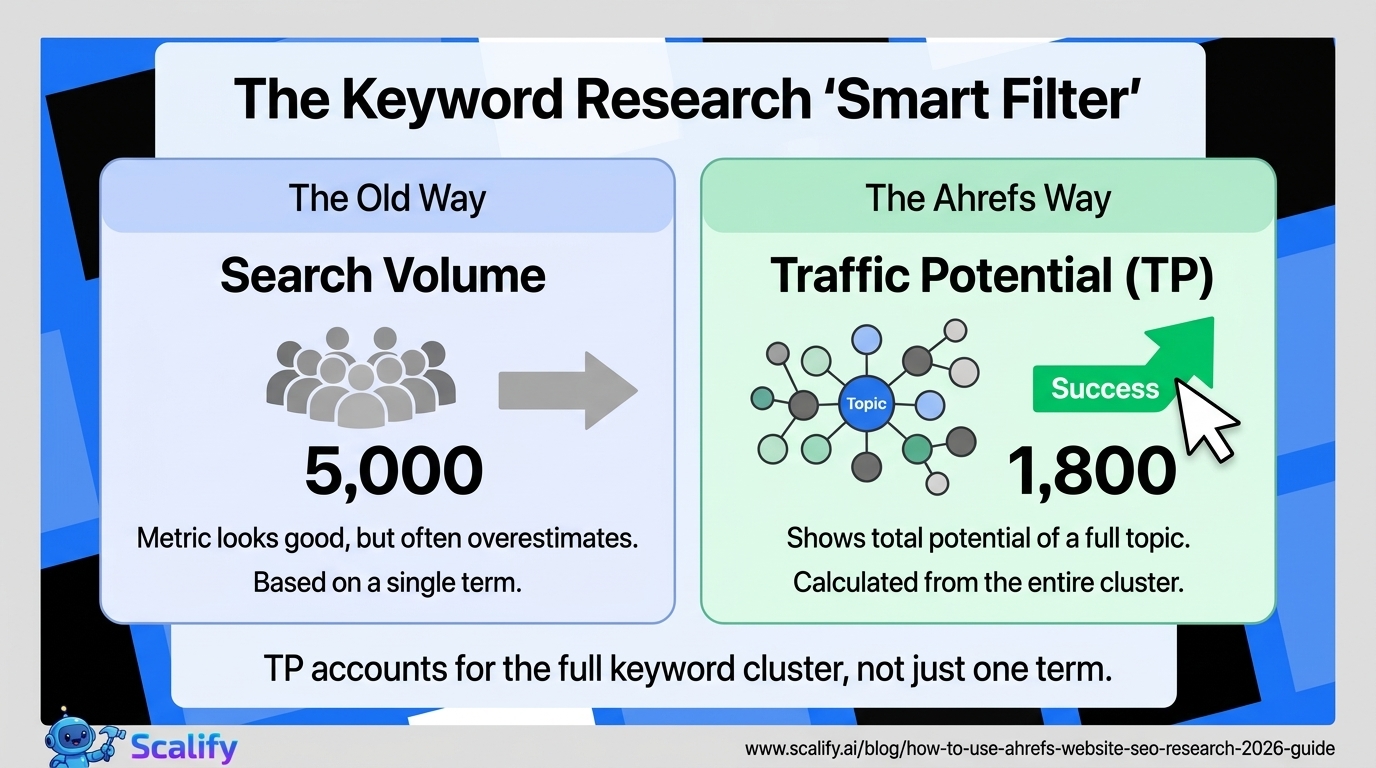
Ignoring Traffic Potential in favor of search volume. A keyword with 5,000 monthly searches where the top-ranking page gets 500 monthly visits (because of zero-click searches or poor snippet CTR) is less valuable than a keyword with 2,000 searches where the top page gets 1,800 visits. Ahrefs' Traffic Potential metric accounts for the full keyword cluster that a page ranking for the target keyword typically also ranks for — making it a more accurate predictor of the actual traffic opportunity than raw search volume.
Taking organic traffic estimates as exact numbers. Ahrefs' organic traffic estimates are approximations derived from ranking data and CTR models — they can be off by 50% or more for individual pages. Use them for relative comparison (this competitor page gets roughly 3x more traffic than that one) rather than as precise metrics for business planning.






























































.jpeg)


.jpeg)


































78 SW 7th St, Miami, FL 33130


